Compliant with ZATCA e-invoicing (Fatoora) — Phase 2
Point of sale and accounting in one system that works even offline
HADAB POS is a Saudi system for restaurants, cafés, retail shops and barber salons. Sell and issue e-invoices, track stock, purchases and customers, and check your reports and accounts, all on your own computer in the shop.
Al Diyafa RestaurantSimplified Tax Invoice INV-000128
Beef burger × 246.00
Large fries12.00
Orange juice × 218.00
VAT 15%9.91
Total76.00 SAR
Approved QR code. The invoice is sent to Fatoora automatically.
A screen for every business
Choose your business and download the trial
One program with three sales screens, depending on your business. The trial is fully featured for 14 days. After that, you activate the plan that suits you, with no reinstall and without losing your data.
Restaurants & cafés
Dine-in, takeaway and delivery orders
Tables and a kitchen display screen
Add-ons and options for every item
Delivery app orders and their commissions
Staff meals and returned dishes
Ingredients deducted from stock with every dish sold
End-of-day leftovers recorded before closing the shift and deducted from stock, to cut waste
Everything in HADAB POS, and what each part does for you
One program covers your shop, from the cashier to the accounts. Pick any part from the list to read what it does and see a screenshot from the software. Parts marked Accounting plan come with the Accounting plan; everything else is included in both plans.
Point of sale (cashier)
Fast selling even at rush hour, by touch, mouse or barcode scanner. Sales keep going even if the internet goes down.
Pay by cash, card (mada) or bank transfer, or split the bill across several methods
Print the receipt on a thermal printer, or send it to the customer as a link
Shifts: open the drawer with its opening balance and close it at the end of the day with a cash count
Put an invoice on hold and come back to it later; discount a single item or the whole invoice
Full or partial returns, with a credit note linked to the original invoice
Voiding an item or order needs permission, and the reason is recorded
On-screen keyboard for touch screens
Customer quotations that turn into an invoice in one click Accounting
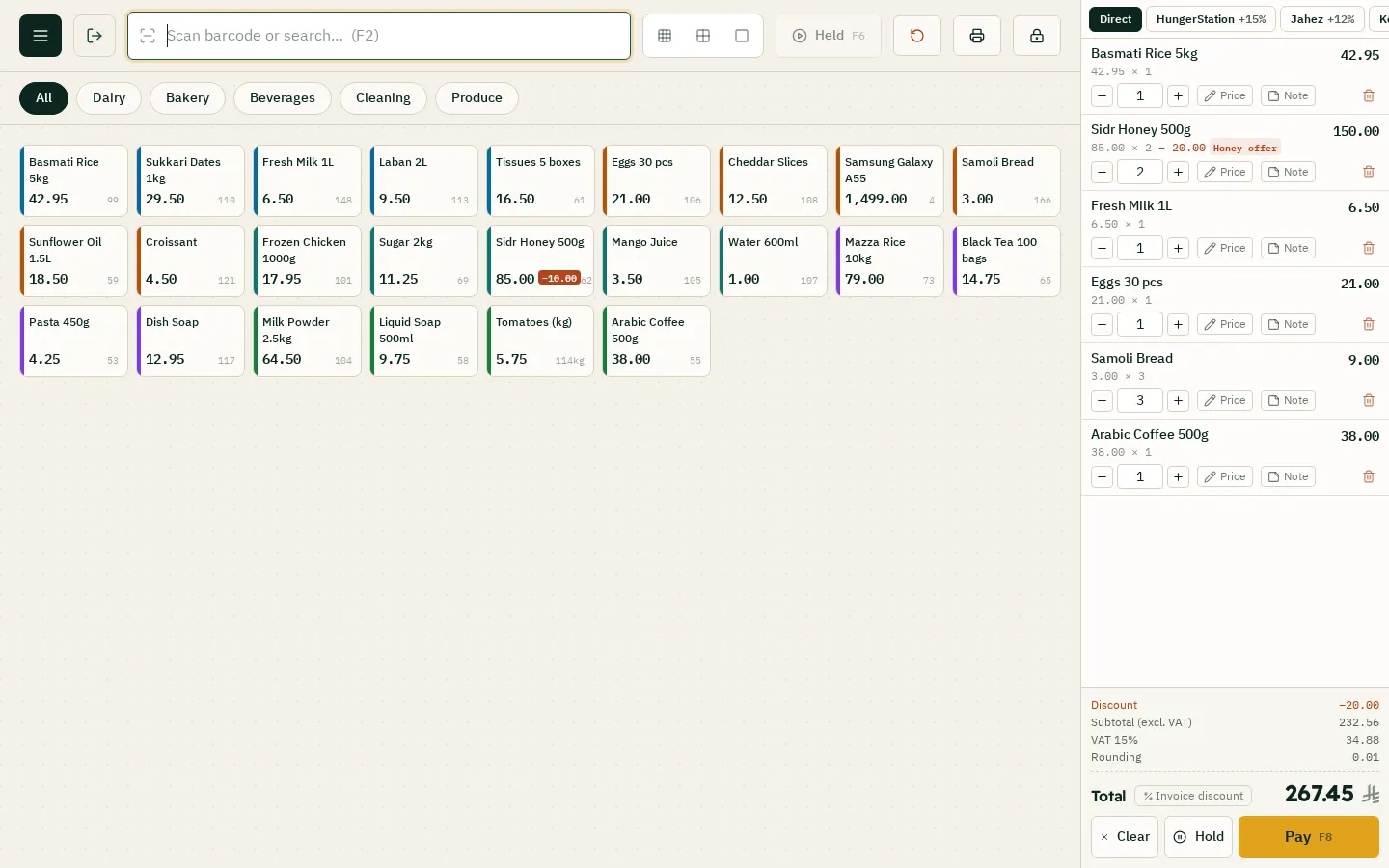
The sales screen: items by category, and the cart with promotions applied automatically
E-invoicing (Fatoora)
Compliant with ZATCA Phase 2 (integration), so you don't need any other software.
Link your device to Fatoora from inside the software, using an OTP from the ZATCA portal
Every invoice is signed and sent to ZATCA automatically
Simplified invoices for individuals, and tax invoices for businesses with their VAT number
An approved QR code on every invoice
Credit and debit notes linked to the original invoice
A log that shows each invoice's status at ZATCA; resend any invoice in one click
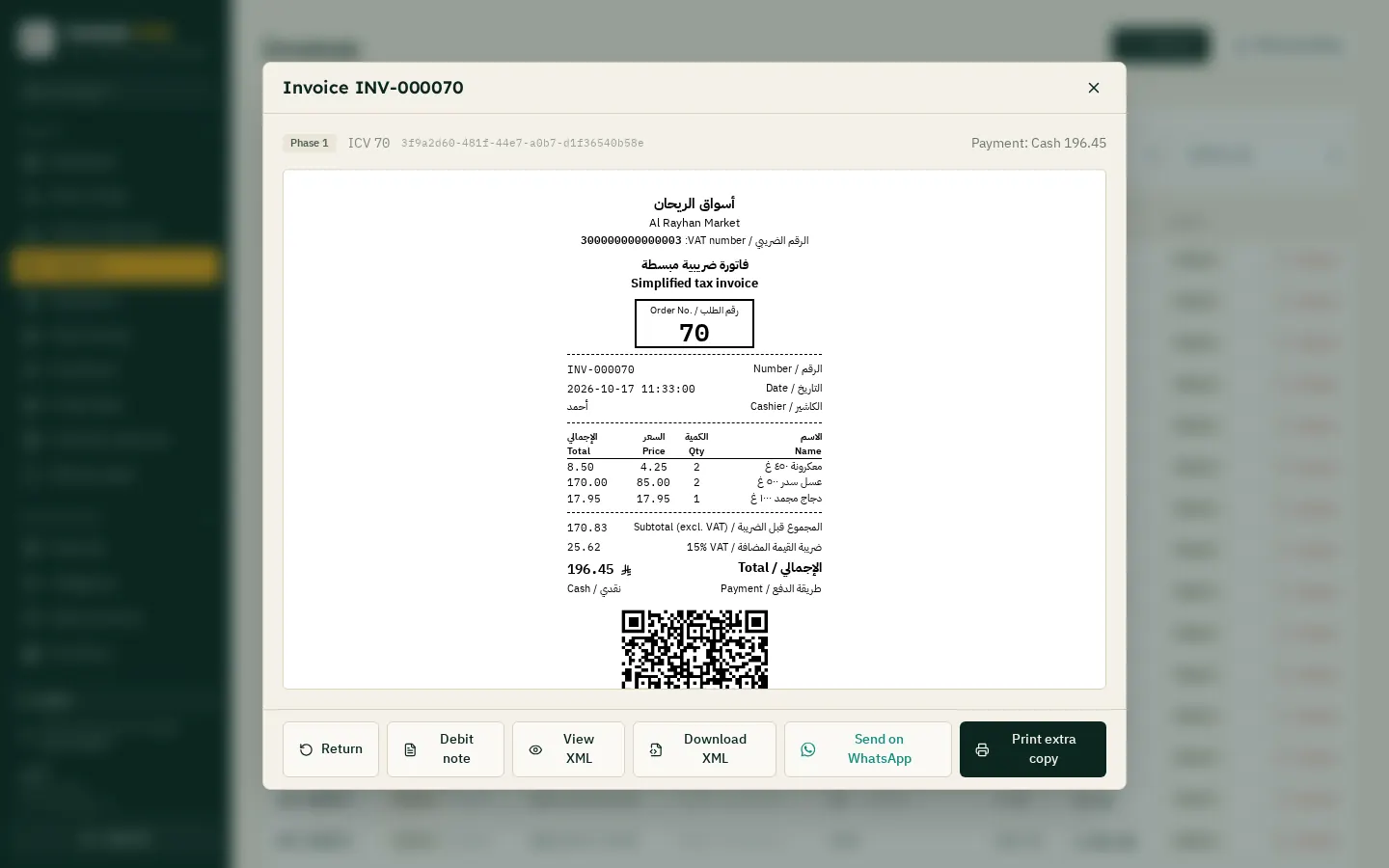
A simplified tax invoice with QR code, plus XML download and WhatsApp sending
Inventory & items
Know at any moment what you have in stock, what each item cost you, and how much you make on it.
Items with barcodes, photos and categories, and VAT-included prices
Units: piece, box and carton, each with its own price and barcode
Import all your items at once from an Excel file
Recipes and raw materials: when a dish is sold, its ingredients (chicken, rice, spices…) are deducted from stock, and raw materials never show on the sales screen
End-of-day leftovers (restaurants): the cashier records the food left over and how much before closing the shift, its ingredients leave stock, and a report shows the waste per dish so you cook what you sell
Expiry dates, with an alert before an item expires
Serial numbers and IMEI: know where each unit came from and who you sold it to
Stock counts and adjustments, and write-offs (damaged, expired or lost) with an automatic journal entry
Separate stock for each branch, and transfers between branches
Alerts for slow-moving items and items about to run out
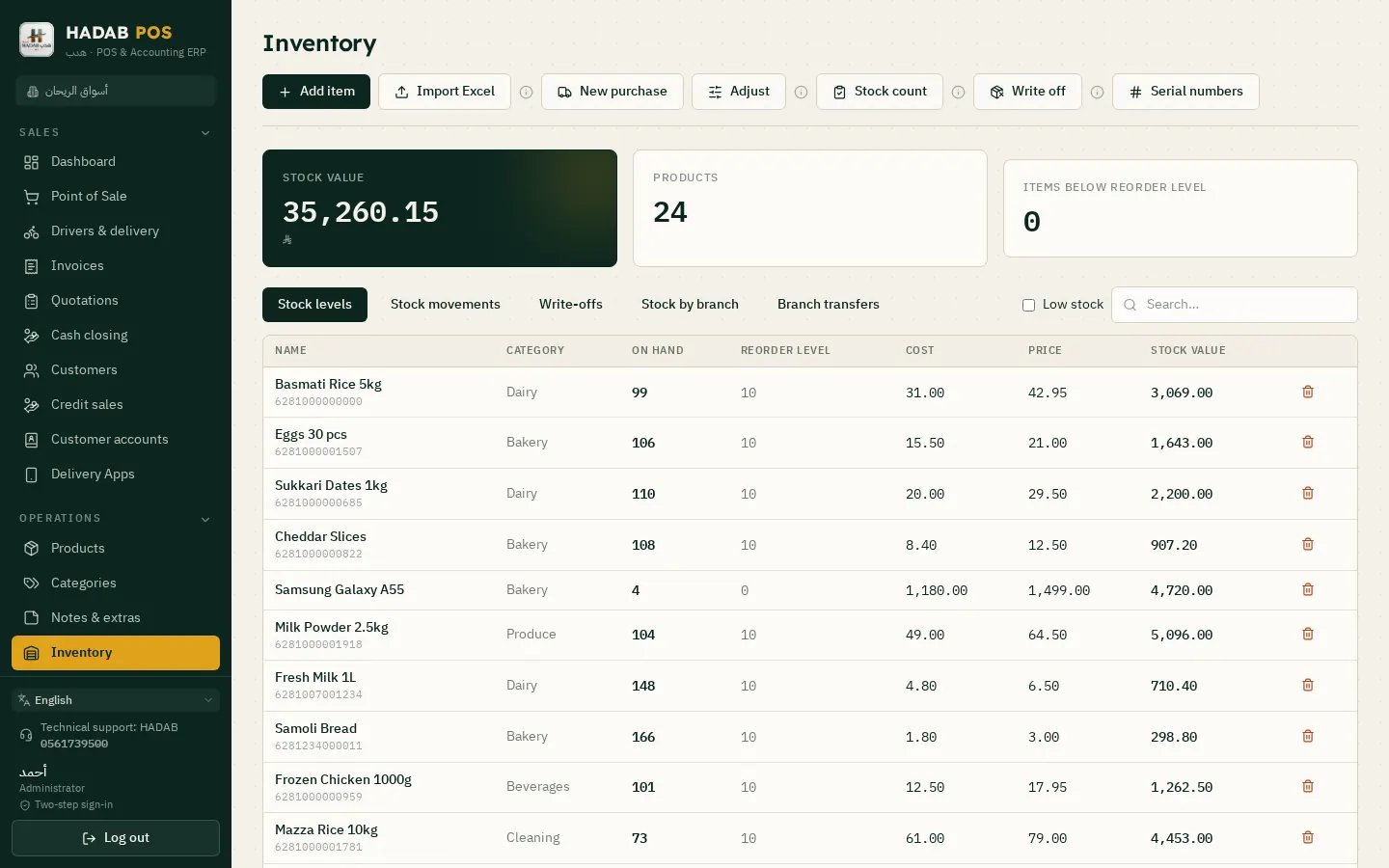
Stock levels and value, with stock counts, adjustments, write-offs and serial numbers
Purchasing & suppliers
From ordering goods to receiving them to paying the supplier, all in one place.
Purchase invoices update stock and average cost automatically
Purchase orders, with large orders waiting for manager approval
An account for each supplier, with balance and statement
Take a photo of a supplier invoice or upload the PDF, and it fills itself in
Buy in foreign currencies, with exchange differences handled
Purchase returns to the supplier
Shipping and customs are spread across items and added to their cost Accounting
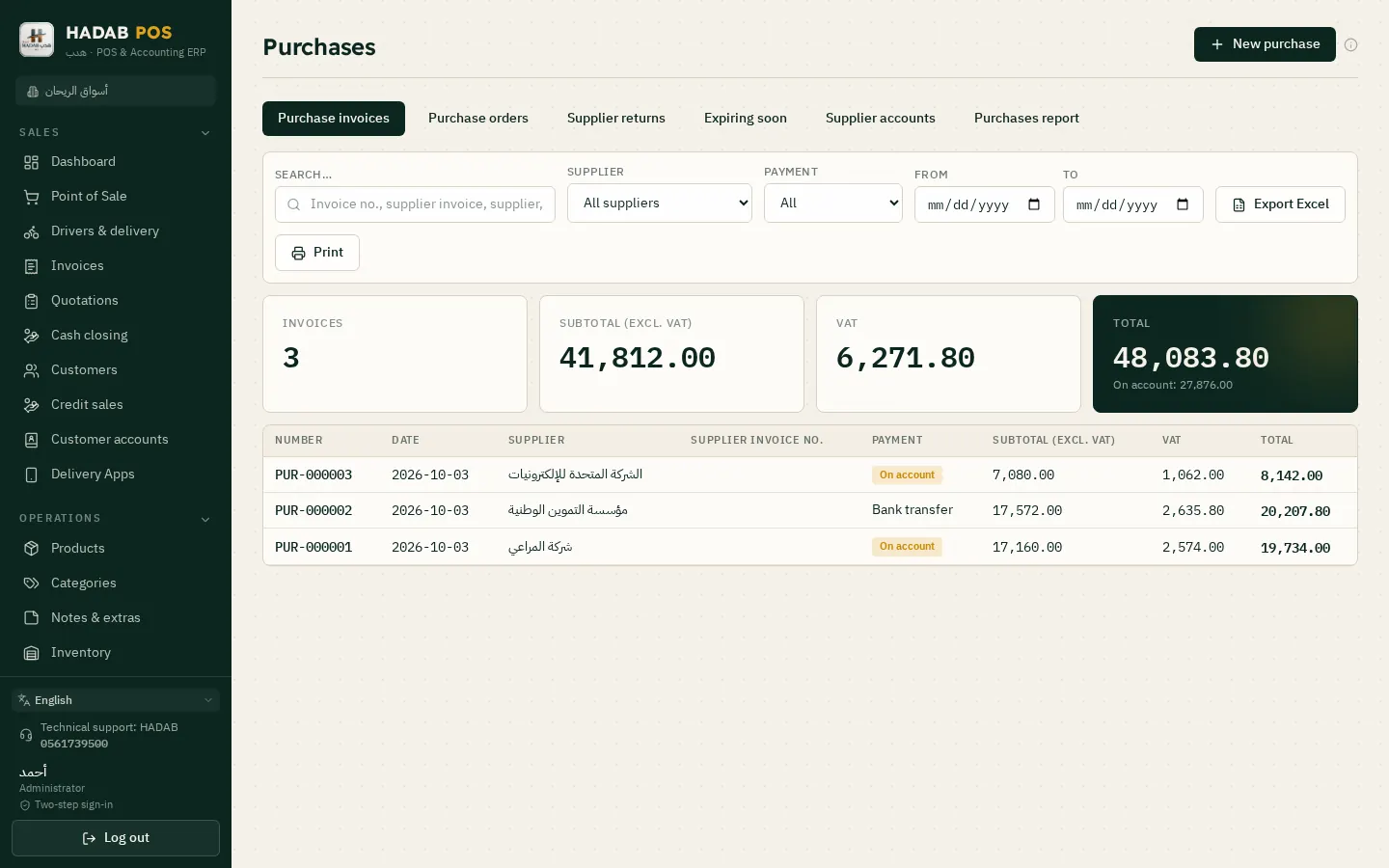
Purchase invoices, purchase orders and supplier accounts
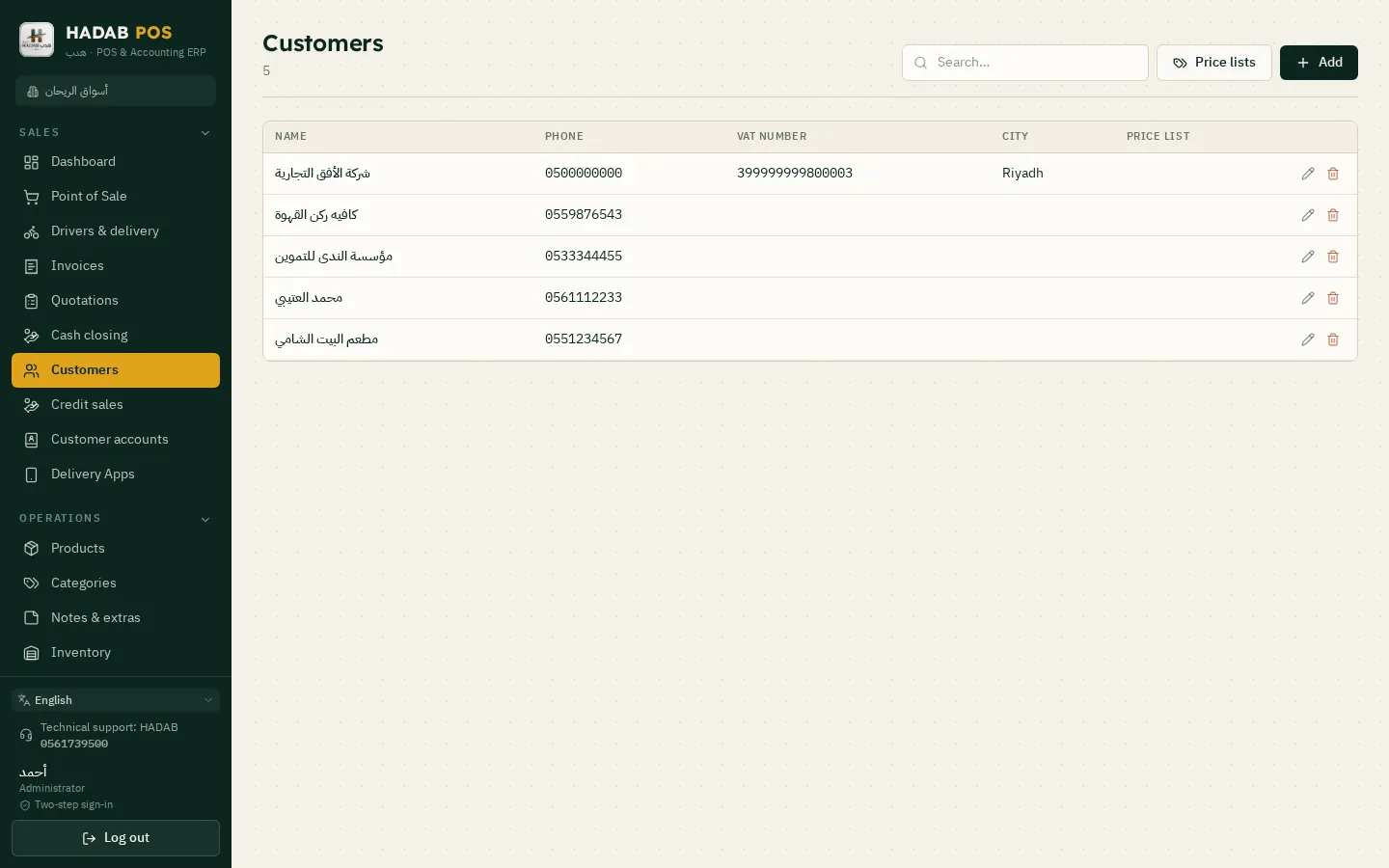
Customers & credit sales
A file for every customer with their purchases and balance, so you know who owes you and when they pay.
Sell on credit, with a credit limit for each customer
A receipt voucher when they pay, and a statement you can print or send
Remind customers of what they owe via WhatsApp or SMS
Debt aging: who is late, and by how many days Accounting
Special price lists for wholesale and business customers Accounting
Recurring invoices for monthly contracts, issued on time Accounting
Customers, their VAT numbers and price lists
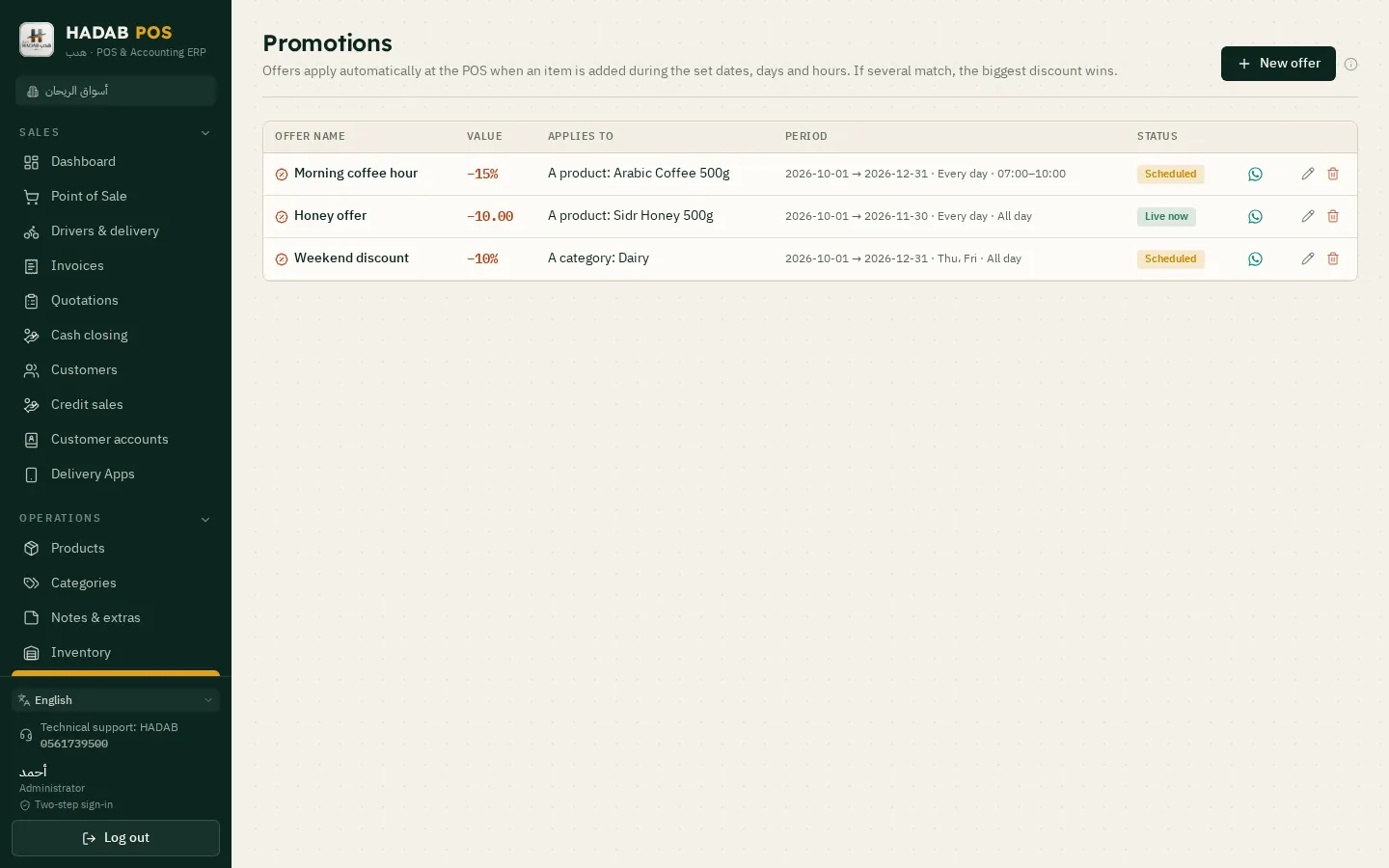
Promotions & loyalty points
Bring customers back: promotions at the times you choose, and points they collect with every purchase.
Percentage or fixed-amount offers, for a set period or on chosen days and hours (like lunchtime)
Loyalty points added to the customer with every invoice
Customers pay part of their bill with points at the cashier
Every discount and point shows up in reports and journal entries
Percentage or fixed-amount promotions, for a period or on set days or hours
Delivery apps & drivers
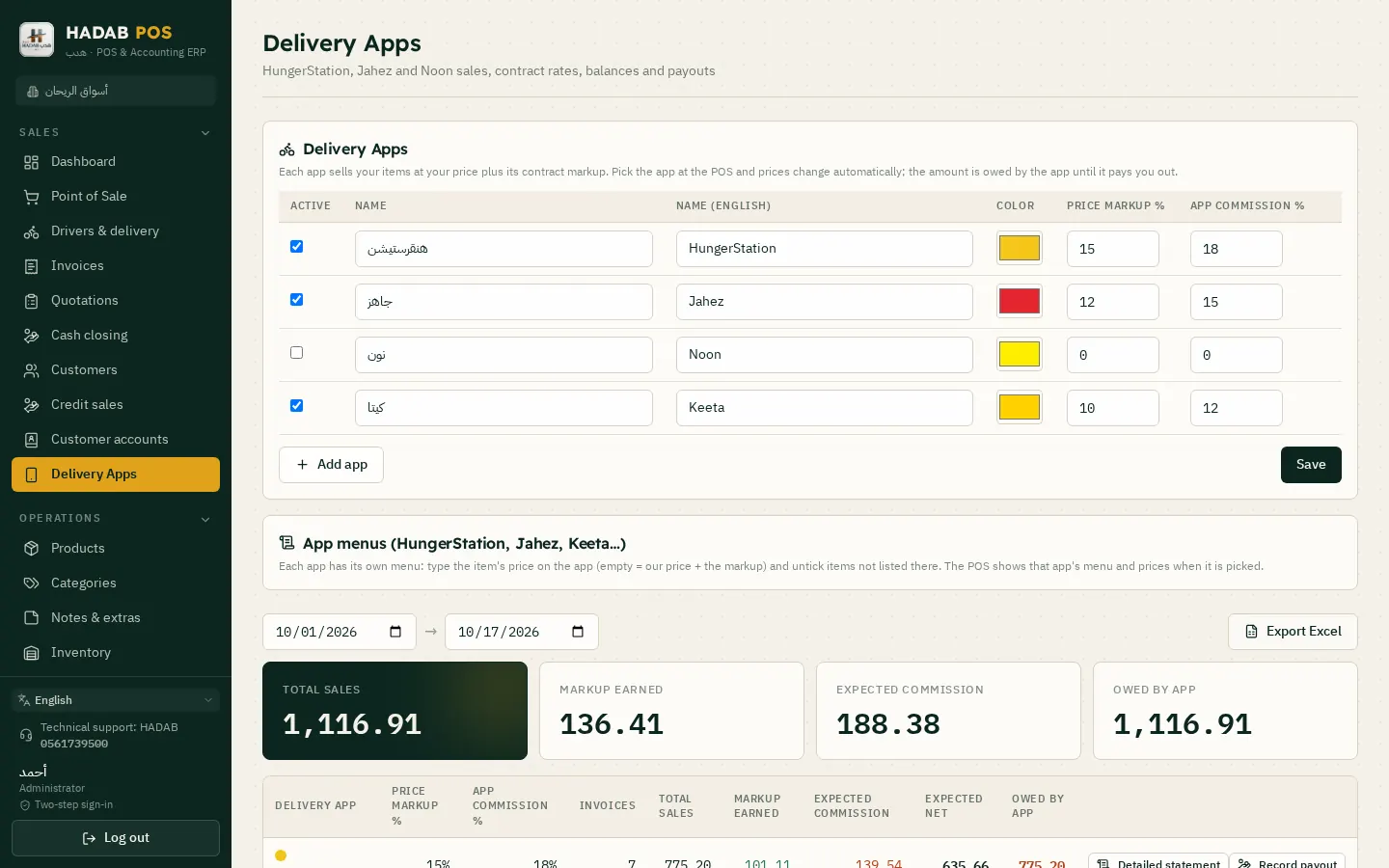
See how much you sold through each delivery app, what its commission is, and how much you will actually receive.
Record orders from HungerStation, Jahez and others, each app with its own commission rate
A report of what each app owes you, and the net amount after commission
Your own drivers: the orders each driver has and the cash they collected
Delivery apps: price markup, commission and the amount due from each app
Accounting Accounting plan
Every sale, purchase and expense posts its journal entry automatically, so your books are ready with no manual entry.
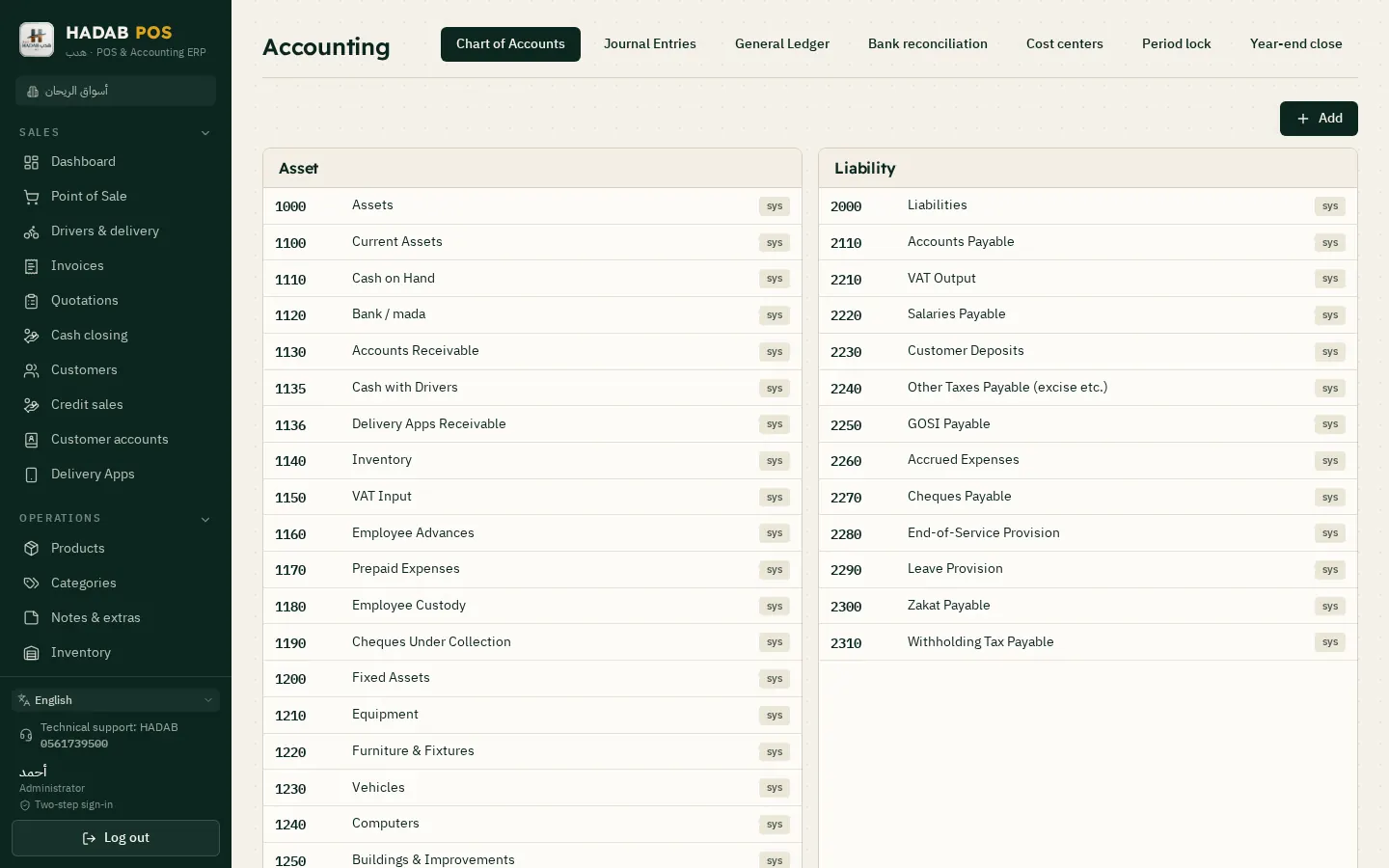
A ready-made chart of accounts that you can edit
Journal entries, general ledger and trial balance
Income statement and balance sheet, compared with last year
Cash flow, and profit for each branch
Bank reconciliation by importing your bank statement
Treasury: cheques, petty cash advances and accruals, with printed payment vouchers
Fixed assets, their monthly depreciation and disposal
Prepaid expenses such as rent, charged month by month
Cost centers: the profit of each activity or project on its own
Budgets, compared with actual results
Period closing and fiscal year-end closing
Chart of accounts, journal entries, general ledger and bank reconciliation
Payroll & staff Accounting plan
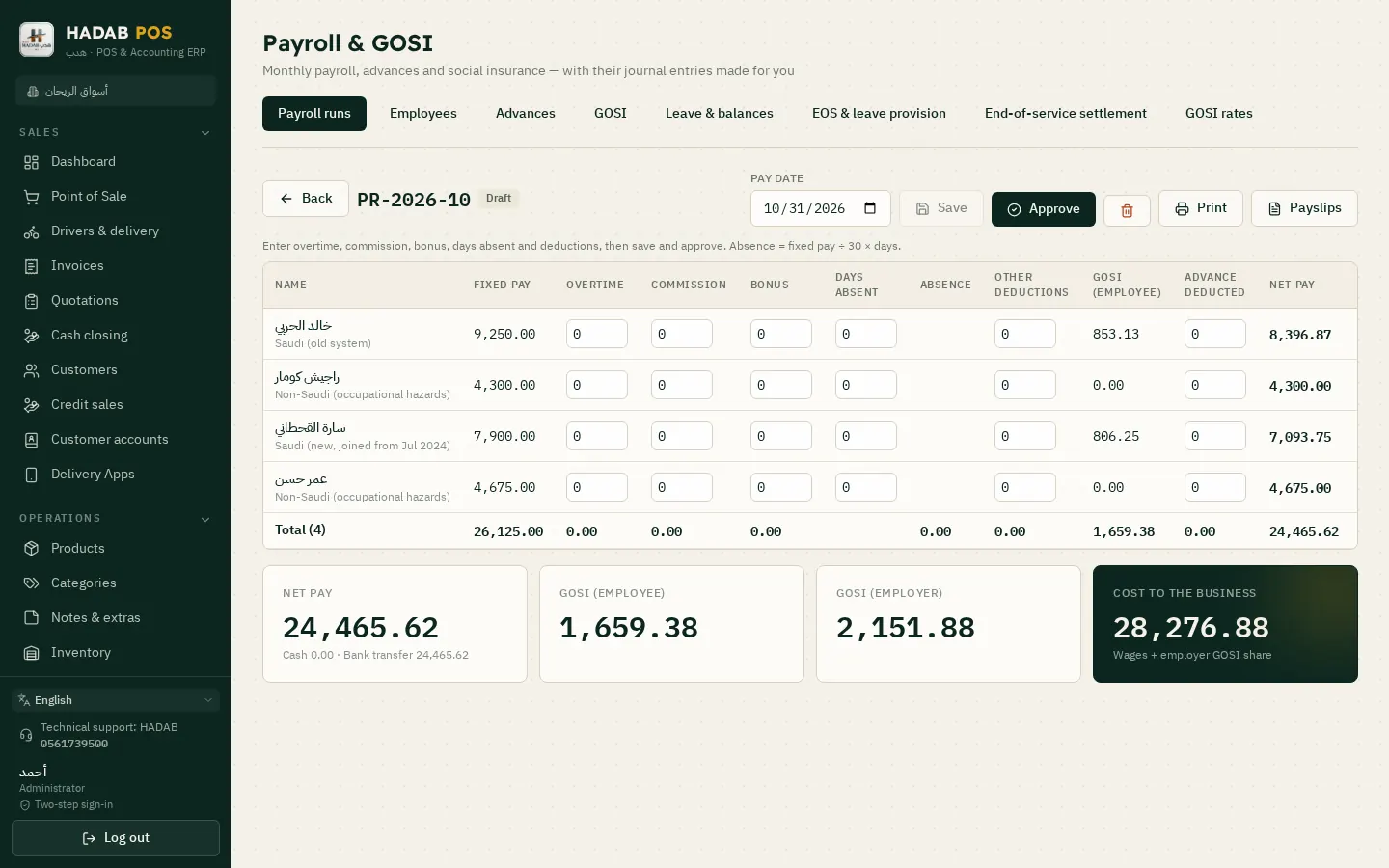
Monthly payroll ready in minutes: allowances, deductions, GOSI and the bank file.
A monthly payroll run with allowances, deductions and salary advances
Social insurance (GOSI) calculated automatically
Bank salary file for the Wage Protection System (Mudad / WPS)
End-of-service benefits and leave
Employee files and contracts, with the payroll journal entry posted automatically
The monthly payroll with social insurance (GOSI)
VAT & zakat
Your VAT return is ready with all its figures, so you don't calculate anything by hand.
VAT return with the figures you copy into the ZATCA portal
Input and output VAT calculated from the invoices themselves
Zakat calculation on the zakat base, with its journal entry Accounting
Withholding tax on payments to non-residents Accounting
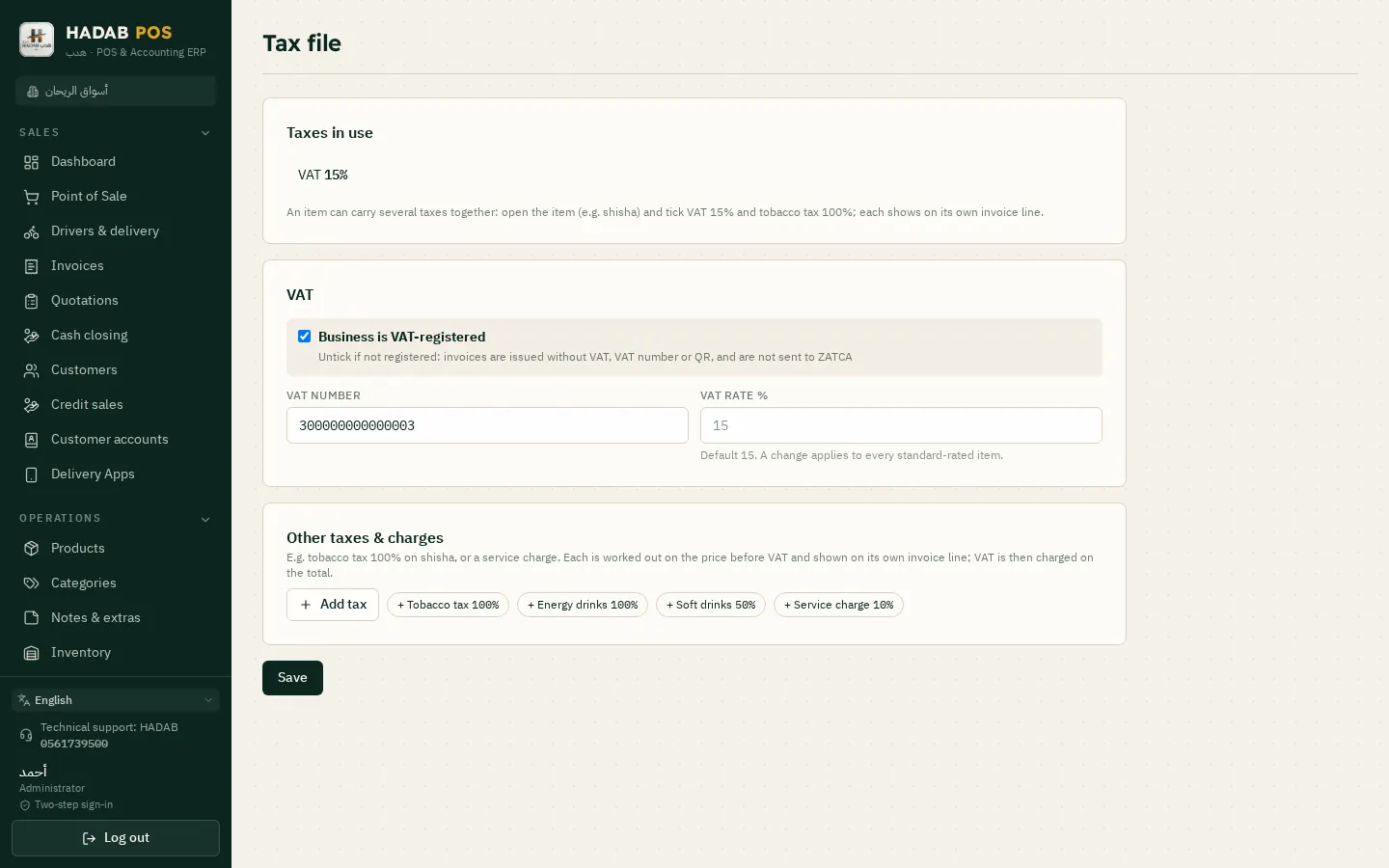
Tax setup: VAT, tobacco tax and service charges
Reports & dashboard
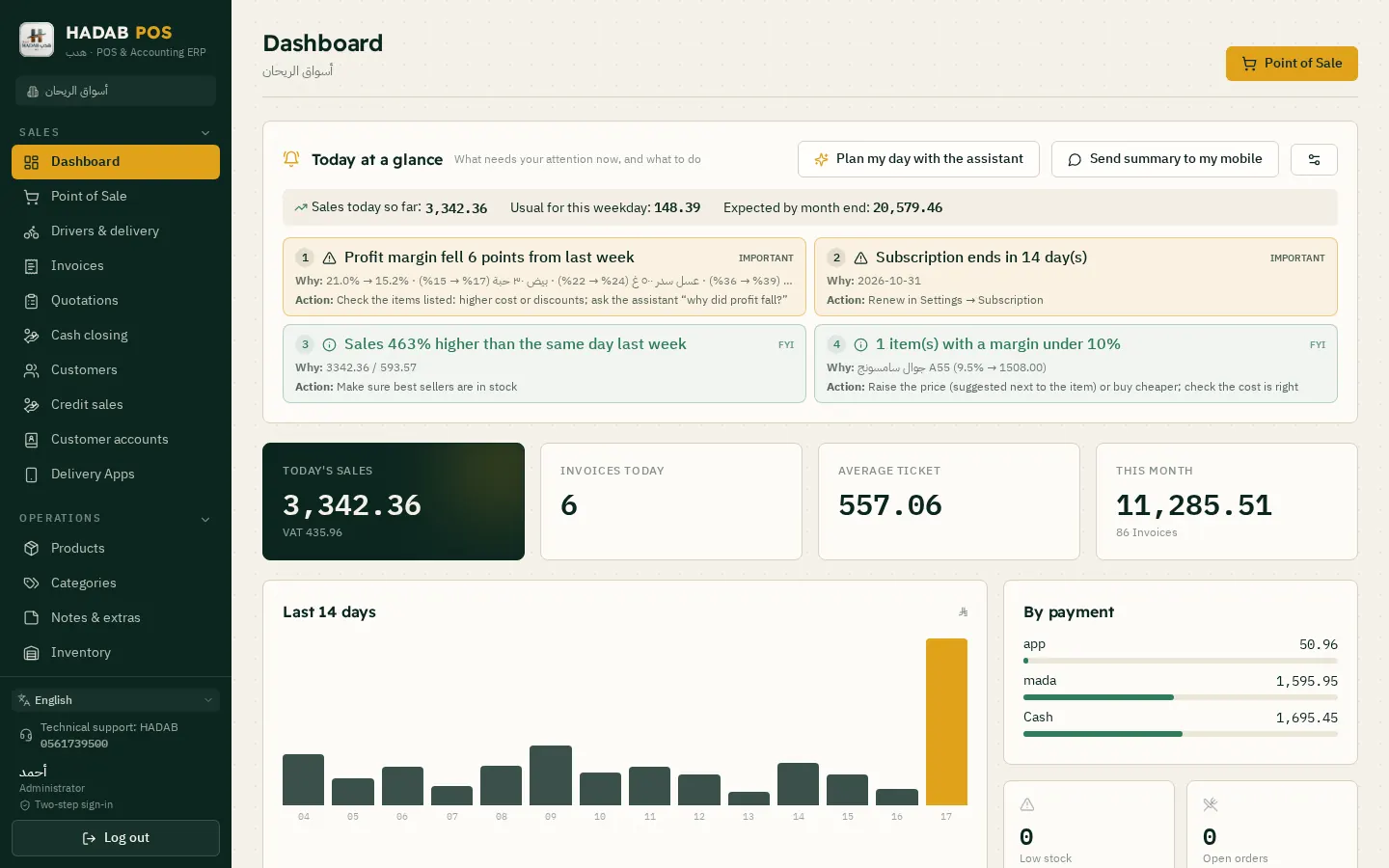
Open the software and see your day at a glance: how much you sold, how much you made, and what needs your attention.
A daily dashboard with sales, profit and best-selling items
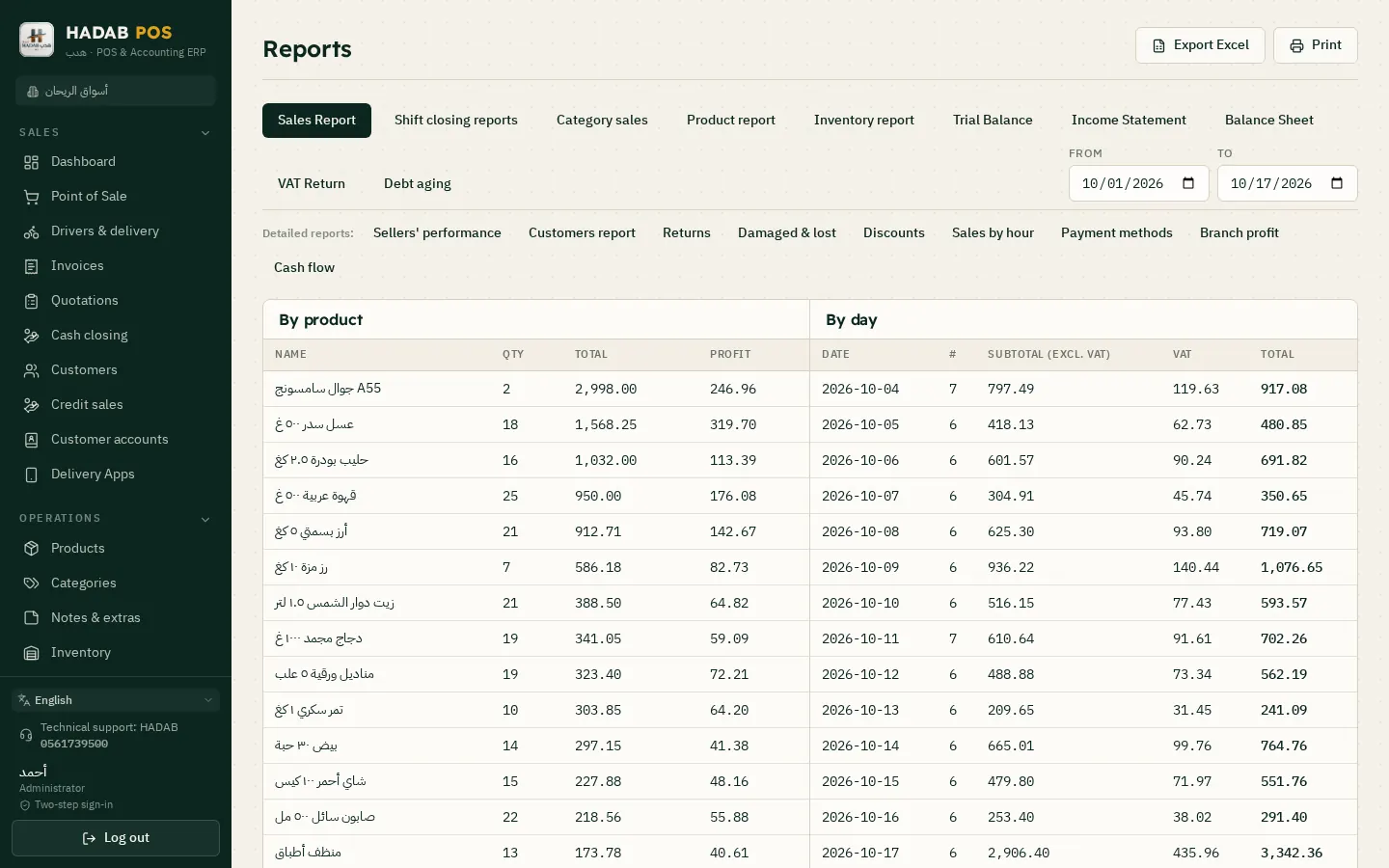
Sales by day, hour, item, category and cashier
Salespeople and barber performance and commissions
Stock reports: movements, damaged and expired items
Expenses by type
Print any report or export it to Excel
A daily summary sent to your email
Reports: sales by product and by day, with export to Excel
Smart assistant
Ask it in your own language: “How much did I sell today?”, “Which items are running low?” or “How do I add an item?”. It answers from your shop's data and teaches you the software step by step.
Free inside the software, and runs on your computer
Understands and answers in Arabic, English, Turkish and Urdu
Reads photos of invoices and files
Makes changes once you approve them, like changing a price or adding an item
An optional AI package for broader questions
The dashboard: today's smart alerts and sales
Languages
Staff from different countries? Each person works in the language they understand, and invoices print in two languages.
The whole software in four languages: Arabic, English, Turkish and Urdu
Switch the language with one button at the top of the screen; each device keeps its own language
Invoices print in Arabic plus a second language of your choice (English, Turkish or Urdu)
Item names in two languages on the receipt
The smart assistant answers in the language you ask in
Branches, devices & the manager's phone
Grow your business with ease: more branches and extra cashier devices, while you keep track from your phone.
Multiple branches, each with its own stock and reports
Sub cashier PCs linked to the main PC over the shop network
Manager's phone: follow sales from your phone inside the shop
A daily backup sent to your email
Move your license to a new computer without losing your data
Updates arrive automatically
Security & permissions
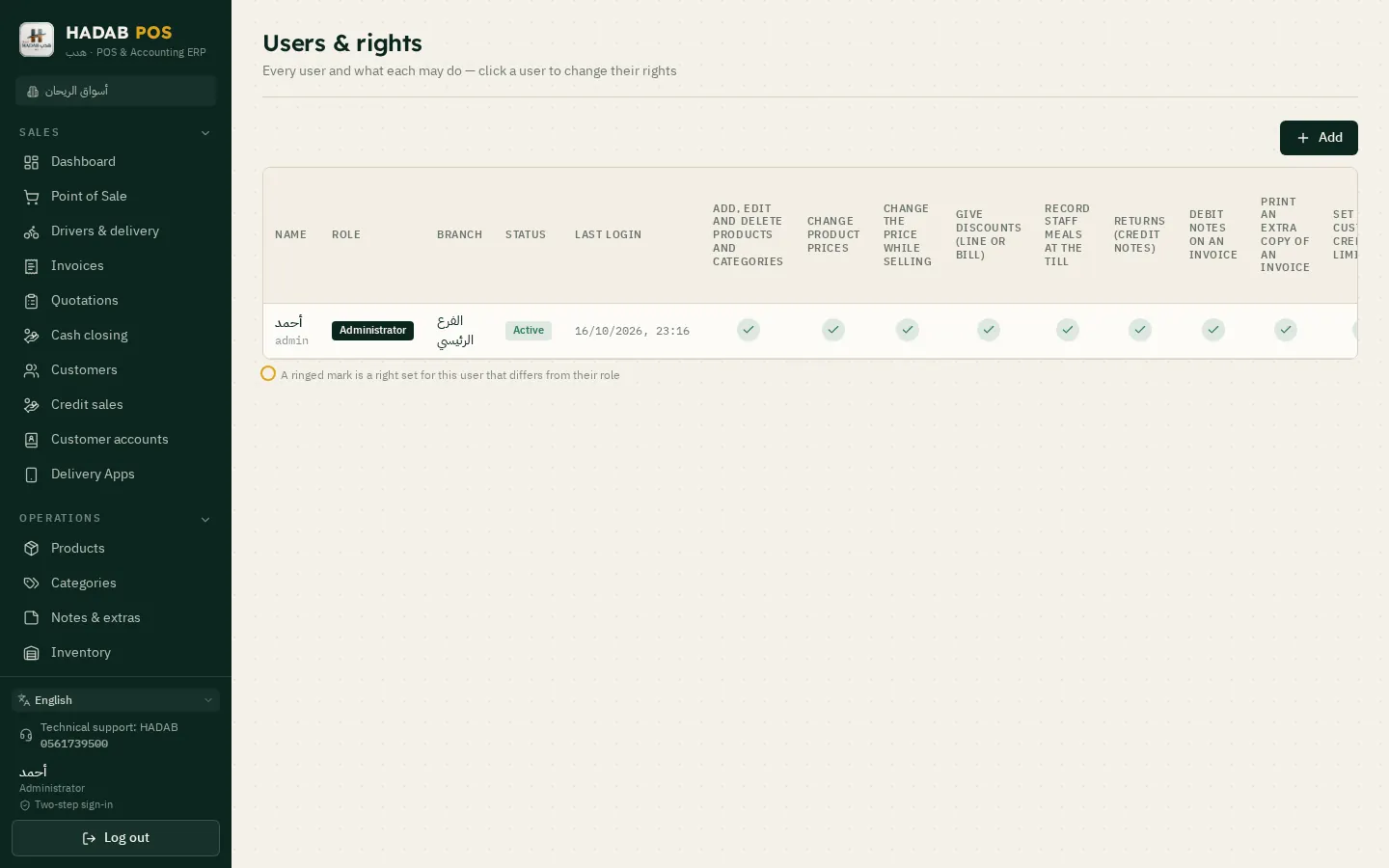
Each employee sees and does only what you allow, and every action is recorded under the name of who did it.
Detailed permissions for each user, on every screen and every action
Two-step verification at login, with a code from an authenticator app
A log that shows who did what, and when
Forgot your password? You get a new one by email from hadabpos.com
Users and the permissions of each one
Plans
Two plans, depending on the size of your business
You install the software once, and your plan decides which parts are switched on. You can upgrade from inside the software at any time, with no reinstall.
POS plan
For most shops, restaurants and salons
Cashier, shifts and returns
ZATCA e-invoicing (Fatoora) Phase 2
Inventory, items, barcodes and serial numbers
Purchasing, suppliers and purchase orders
Customers, credit sales and receipt vouchers
Promotions, loyalty points and delivery apps
Expenses and the VAT return
Sales and stock reports
The free smart assistant
1,500 for the first year, VAT included
Then 575 a year for support and system use (VAT included)
More than one PC? Each main PC costs its plan price (1,500 SAR for the POS plan, 3,000 SAR for the Accounting plan), and each sub PC (an extra cashier linked to the main PC) is only 575 . All prices include VAT.
Example: a restaurant with 3 tills on the POS plan = 2,650 the first year (1,500 + 575 + 575), then 1,725 a year (575 per device).
Smart assistant package (optional): the free assistant comes with both plans; the package adds AI for broader questions and more accurate reading of photos.
Works offlineSales don't stop when the internet goes down, and invoices are sent to ZATCA once it's back.
Your data stays with youYour data is saved on your own computer, and a daily backup is sent to your email.
Easy for your staffA clear Arabic interface, with English, Turkish and Urdu too.
Saudi supportWe help you install and connect to Fatoora over WhatsApp.
FAQ
Got a question?
Is the software compliant with ZATCA?
Yes. HADAB is compliant with Phase 2 of ZATCA e-invoicing (Fatoora). You link your device to the platform from inside the software using an OTP from the ZATCA portal, and from then on every invoice is signed and sent automatically.
Does it work without internet?
Yes. Sales, printing and reports all work offline, and invoices are sent to ZATCA once the connection is back. The device only needs to go online from time to time.
Does the software support languages other than Arabic?
Yes. The software comes in four languages: Arabic, English, Turkish and Urdu. You switch the language with one button at the top of the screen, so each device runs in the language that suits the person using it. Invoices print in Arabic plus a second language of your choice (English, Turkish or Urdu), and the smart assistant understands your questions and answers in the same languages.
What hardware do I need?
A Windows PC or cashier terminal with a thermal receipt printer. A barcode scanner and a cash drawer are optional. You can also link several cashier devices to a main PC over the shop network.
How does the free trial work?
Download the version that fits your business and install it. It runs fully featured for 14 days. After that, contact us to activate your plan, and your data stays exactly as it is, with no reinstall.
I forgot my password. What do I do?
On the login screen, click “Forgot password?” and enter your username or email. You will get a message from hadabpos.com with a new password that is valid for 24 hours. Your old password keeps working until you use the new one. If the message doesn't arrive, check your Spam folder, or contact us.
I changed my computer. Will I lose my subscription or my data?
No. We move your license to the new computer with the same remaining period, and you move your data with a backup.
What is the difference between the POS plan and the Accounting plan?
The POS plan covers sales, invoicing, inventory, purchasing, customers and sales reports, and it suits most shops. The Accounting plan adds full accounting, payroll, fixed assets, zakat and financial statements. You can upgrade at any time from inside the software.
How much is an extra (sub) PC?
A sub PC (an extra cashier linked to the main PC over the shop network) is only 575 SAR, and its sales and stock show up together with the main PC in one place. A main PC (for example, one in another branch) costs the plan price: 1,500 SAR for the POS plan or 3,000 SAR for the Accounting plan.
Does it work for more than one branch?
Yes. Each branch has its own stock and reports, you can transfer goods between branches, and with the Accounting plan you can see each branch's profit.
Ready to start?
Message us on WhatsApp and we'll help you install the software and connect to Fatoora.