(optional module, hidden until you switch it on, for parts shops and car workshops):
Switch on: Settings → POS section → «Spare-parts catalogue (fitting cars and OEM number)». A Parts catalogue screen appears in the menu.
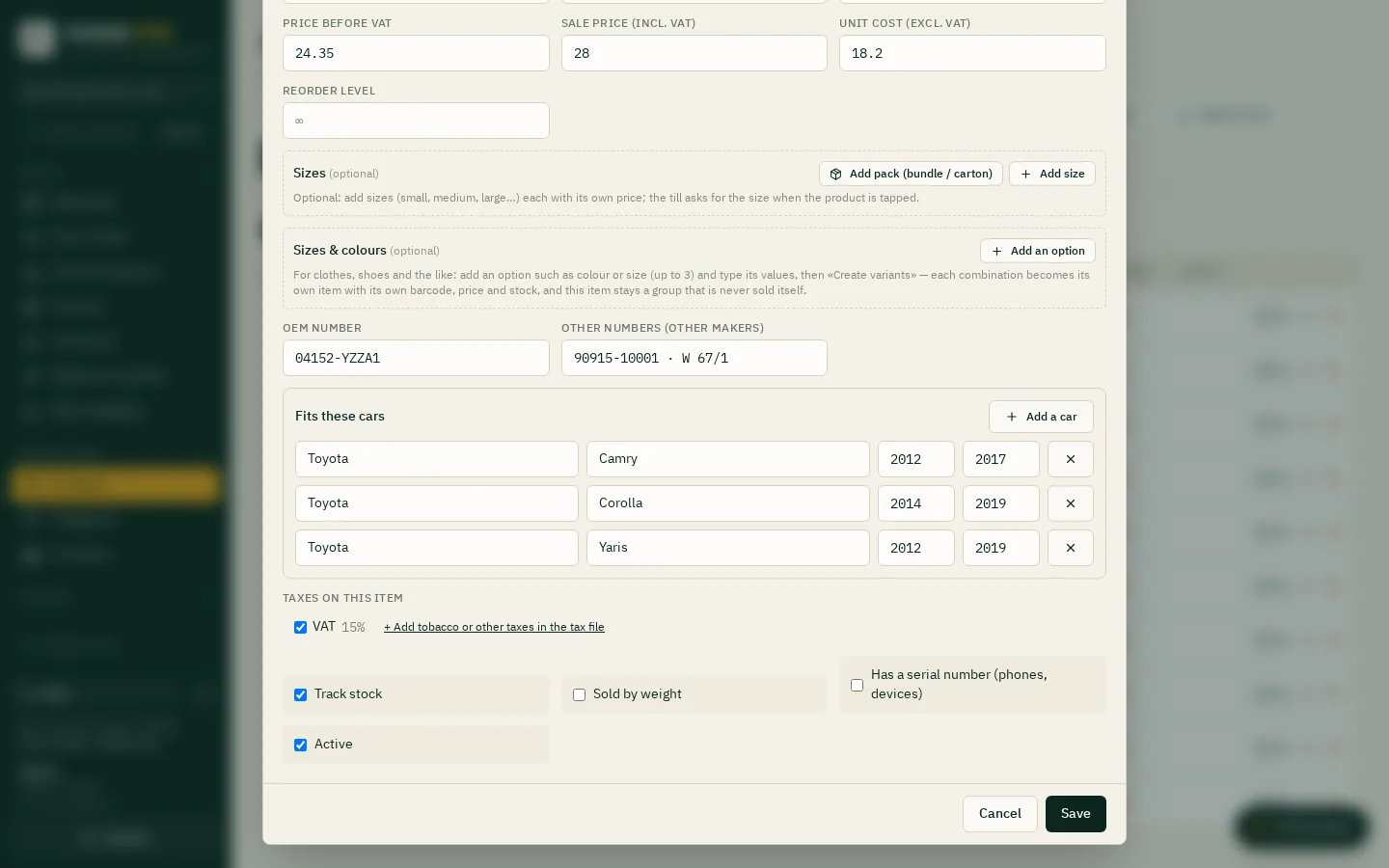
Fill a part: the item card gets OEM number, other numbers (other makers) and Fits these cars: «Add a car», then make, model (empty = all models) and years from / to (empty = all years). A part can fit many cars.
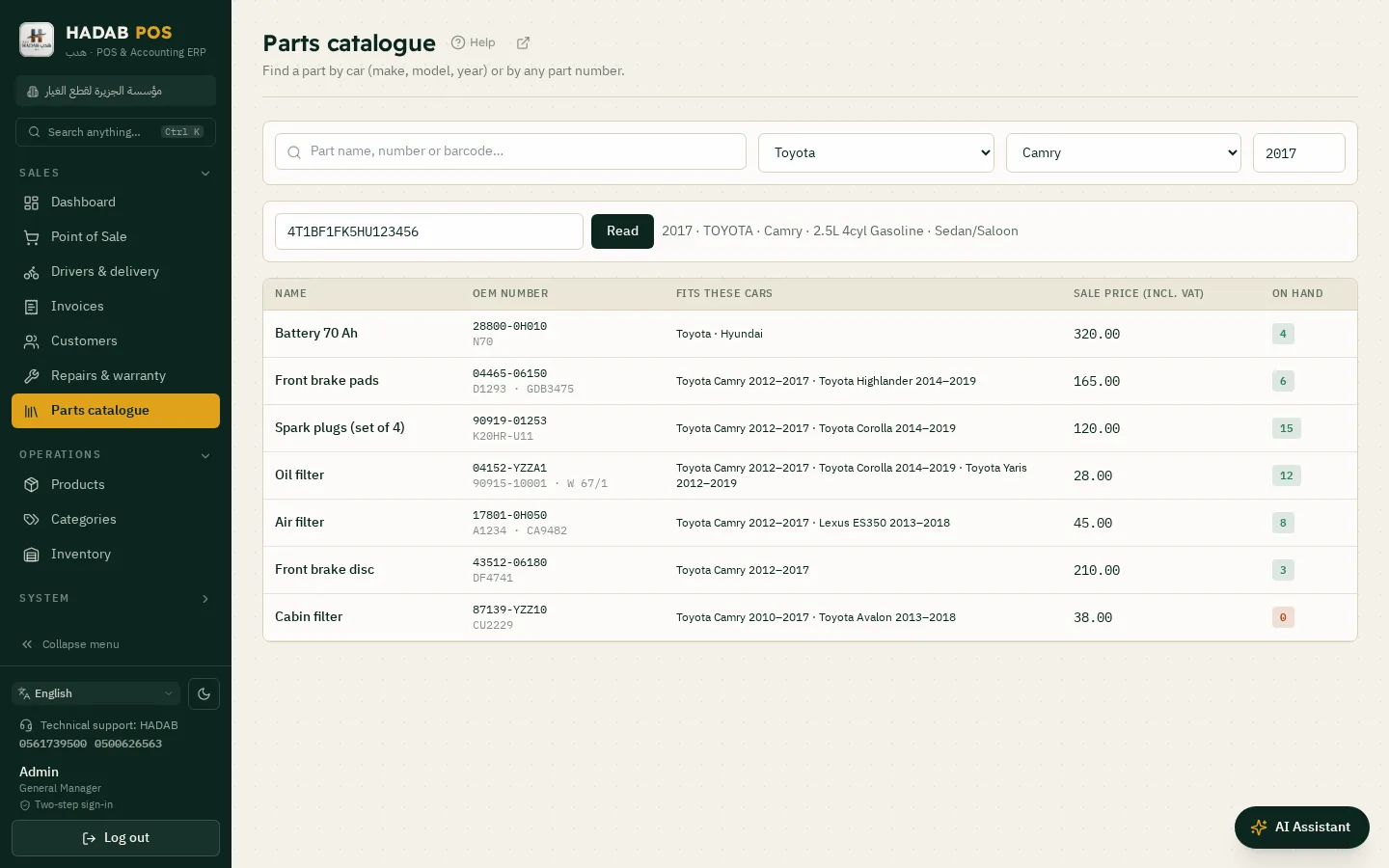
Search: type the part name, number or barcode, or pick make and model and type the year; matching parts show with price and stock (in-stock first). Numbers match without dashes or spaces (04152-YZZA1 = 04152yzza1).
The fields are part of the item, so every till and branch gets them automatically, and the Products search box finds them too.
Heavy equipment: the make list also holds excavator, loader, dozer, grader, crane, roller, forklift and truck makes (Caterpillar, Komatsu, Hitachi, Volvo CE, JCB, Doosan, Liebherr, Sany, XCMG…) with common models; pick make and model like a car (years empty = all). A make or model not listed can be typed by hand.
Not included: a ready-made car database; the shop fills its own (no running cost). Original numbers and diagrams from the makers' catalogues are not included (licensed paid services).
First start: choosing «Retail shops» asks «What kind of shop?»; pick «Car spare parts» and the catalogue is switched on, then tick the makes you sell: they come first in the lists with their models and years ready (from the US NHTSA database; Gulf and Chinese makes may be thin, type your own models).
VIN: in the Parts catalogue type the 17 characters and press «Read»: the car (make, model, year, engine) shows and its parts are searched; needs internet and is most accurate for US-market cars.
Pull from a link: Parts catalogue → «Pull from a link» (or the link box at first start): paste an https link to a CSV / JSON file in the Excel import columns (ours or your supplier's), press «Preview», then import; existing parts are updated. Only public https links (never an internal network), files up to 8 MB; use a file you have the right to use.
Excel: columns «OEM number», «Other numbers», «Fits these cars» (e.g. Toyota/Camry/2012-2017; Honda/Accord) in import and export.
Steps
Switch the catalogue on: at first start pick «Retail shops», then «Car spare parts», and tick the makes you sell; or Settings → POS section → «Spare-parts catalogue».
Open any item card: the fields «OEM number», «Other numbers (other makers)» and «Fits these cars» appear. Press «Add a car», then pick make, model (empty = every model) and years from / to (empty = every year).
To enter many parts at once: Products → «Excel import» with the columns «OEM number», «Other numbers» and «Fits these cars»; write cars as Toyota/Camry/2012-2017; Honda/Accord.
Or pull the catalogue from a link: in the Parts catalogue press «Pull from a link», paste an https link to a CSV or JSON file with the same columns (ours or your supplier's), press «Preview» to see the rows, then «Import». Existing parts are updated, not duplicated. The same link box is at first start.
Search in the Parts catalogue screen: type the part name, number or barcode, or pick make and model and type the year. Numbers match without dashes or spaces.
Or type the chassis number (17 characters) and press «Read»: the car shows with its engine, make, model and year are filled and its parts are searched. Needs internet and is most accurate for US-market cars.
The result shows the price and stock of each part (in stock first), and you sell it from the till with an ordinary invoice.
Parts catalogue: search by chassis number, the car's parts with price and stockPart card: OEM number, other numbers and the cars it fits
If you get stuck on any step, ask the smart assistant inside the program.
No. What comes ready is the lists of makes and models (from NHTSA and VehiclesDB). You enter the part numbers or bring them from your supplier's file. The makers' catalogue numbers and drawings are licensed data and are not included.
Which links does «Pull from a link» accept?
Public https links only, to a CSV or JSON file up to 8 MB. Links to an internal network, to this machine, or with a password are refused. Use a file you have the right to use.
What if the chassis number is not recognised?
Gulf or Chinese cars may come back with a make but no model, or not at all. Pick the make and model by hand from the lists.
Does it find alternative parts by itself?
No. You type the other numbers for each part or import them, and then the search finds the part by any of them.