HADABPOS Free trial
New — HADAB Factory on the Accounting plan

Software for factories and workshops: from raw material to the invoice

HADAB Factory is the edition of HADAB for businesses that make their own product: food, sweets and central bakeries, detergents and perfumes, plastics and cartons, furniture and workshops. Write the recipe of each product once, run production orders at their real cost, sell with sales orders and deliver in parts, and every step is posted to the accounts by itself.

Windows — version 1.0.144 — 140 MB

Recipes and production orders · Real production cost · Quality and batch trace · Full accounting

HADAB POS › Factory & production software

A recipe for every product, and a production order at its real cost

Recipes and production orders

Write the recipe once; the program works out every order.

  • Bill of materials: how much one batch gives and how much of each material it takes (kg or grams)
  • Half-made items inside another product, with an automatic sub-order
  • Starting an order issues the materials to work in progress
  • Finishing puts the product into stock at its real cost with batch no. and expiry

Cost and waste

Know what the product really cost you.

  • Materials + labour + running costs (power, gas, upkeep)
  • Waste shown for every order
  • Cost report: recipe cost against real cost per item
  • Entries post themselves: materials, work in progress, finished goods

Stages, work centers and hours

Every product with its stages and machines.

  • Work centers: a machine, line or station with cost per hour, worker rate and daily capacity
  • Stages in each recipe (mix, shape, bake, pack) with their hours
  • Log the hours of each worker on the order, with a labour report
  • Subcontracting: send the order to an outside workshop and its fee goes into the cost
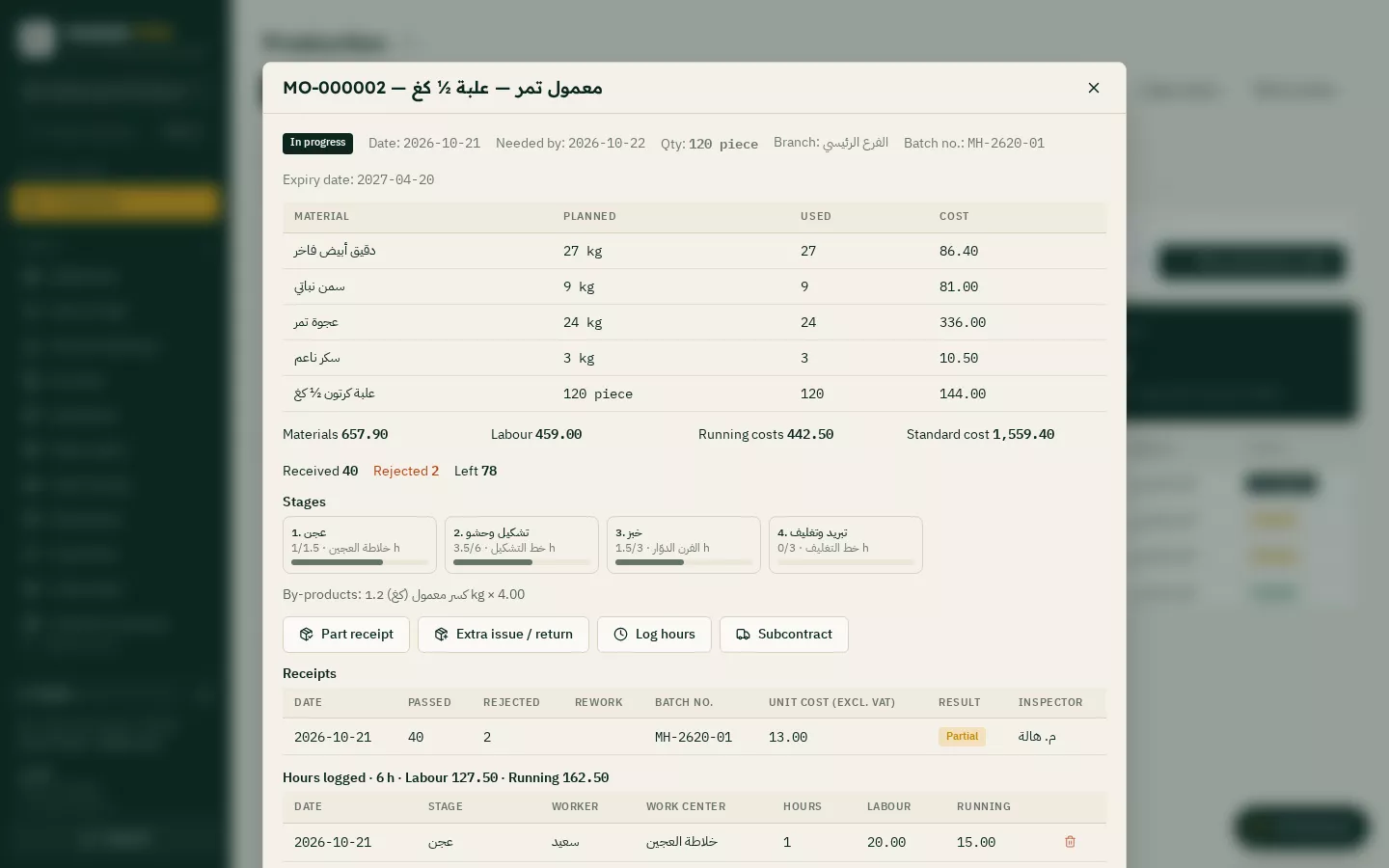
A real production order: materials, stages, partial receipts and labour hours

Know what to buy, and deliver to the customer in parts

Material needs (MRP)

Before you start, know what you are short of.

  • Opens every planned order down to the raw materials
  • Compares them with stock and open purchase orders
  • Purchase orders ready for each supplier in one click
  • Make for sales orders: production orders for what customers need

Sales orders and delivery notes

The sales cycle of factories and wholesale.

  • Quotation → sales order with the customer PO number and delivery date
  • A printed delivery note signed by the receiver; deliveries in parts
  • One tax invoice for everything delivered, on the customer account
  • Credit limit, down payments deducted from the invoice, returns on the delivery note and a shipping charge

Schedule, capacity and forecast

Know when every order will be done.

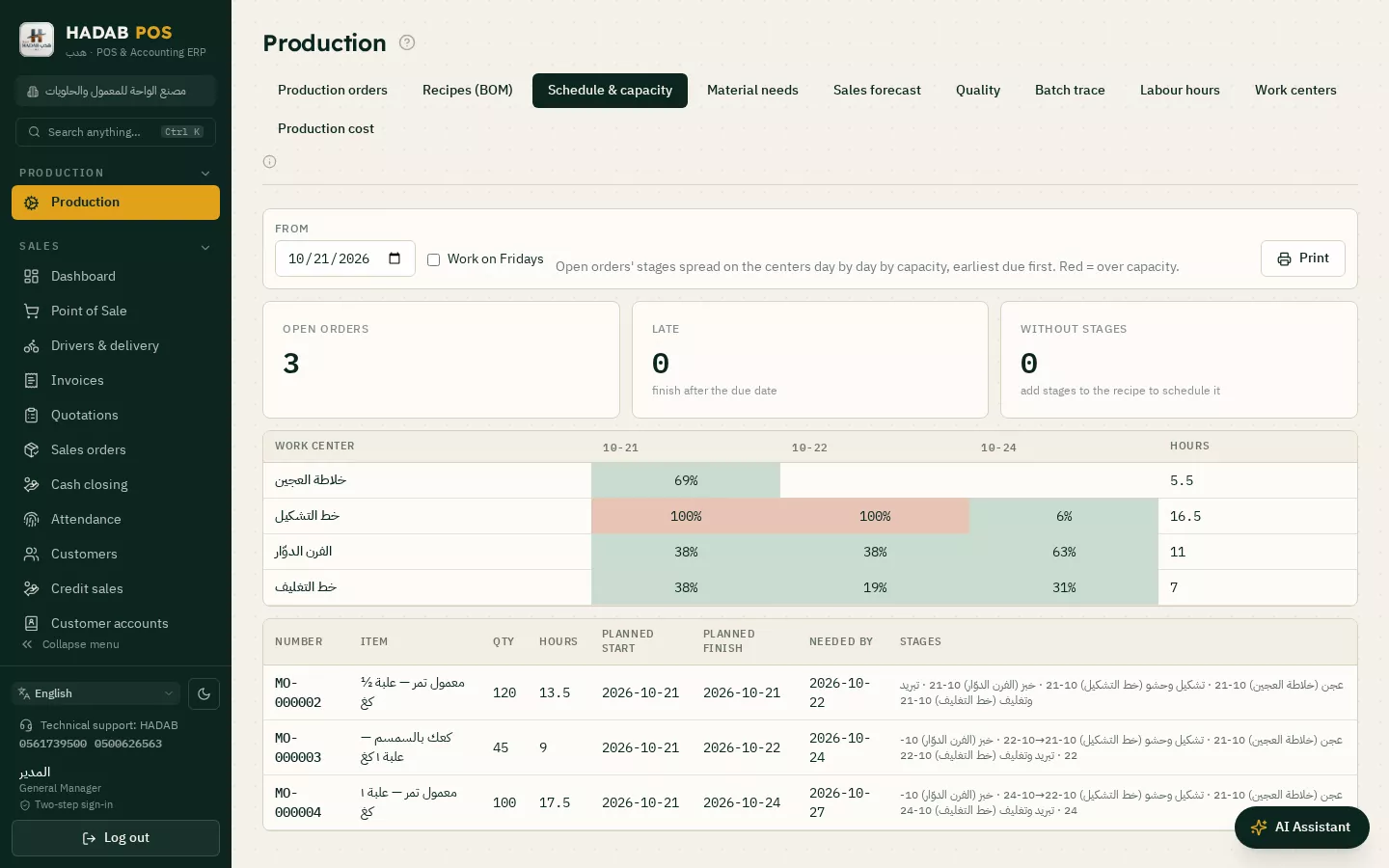
  • Capacity grid: the load of each machine day by day, red when over
  • Lead time and safety stock per material: «order before» a set date
  • Sales forecast from your real sales → production orders in one click
  • Late orders show up as they happen
Capacity: the load of every machine and line day by day

Every box knows where it came from and where it went

Quality checks and partial receipts

Only what passed enters stock.

  • A checklist per recipe (weight, colour, seal…) filled in by the inspector
  • Partial receipts before the order ends, with rejected and rework
  • Extra issue and material returns, and alternate materials when one runs short
  • By-products and scrap at their value, taken off the main product cost

Batch trace and recall

If there is a recall, you know in a minute.

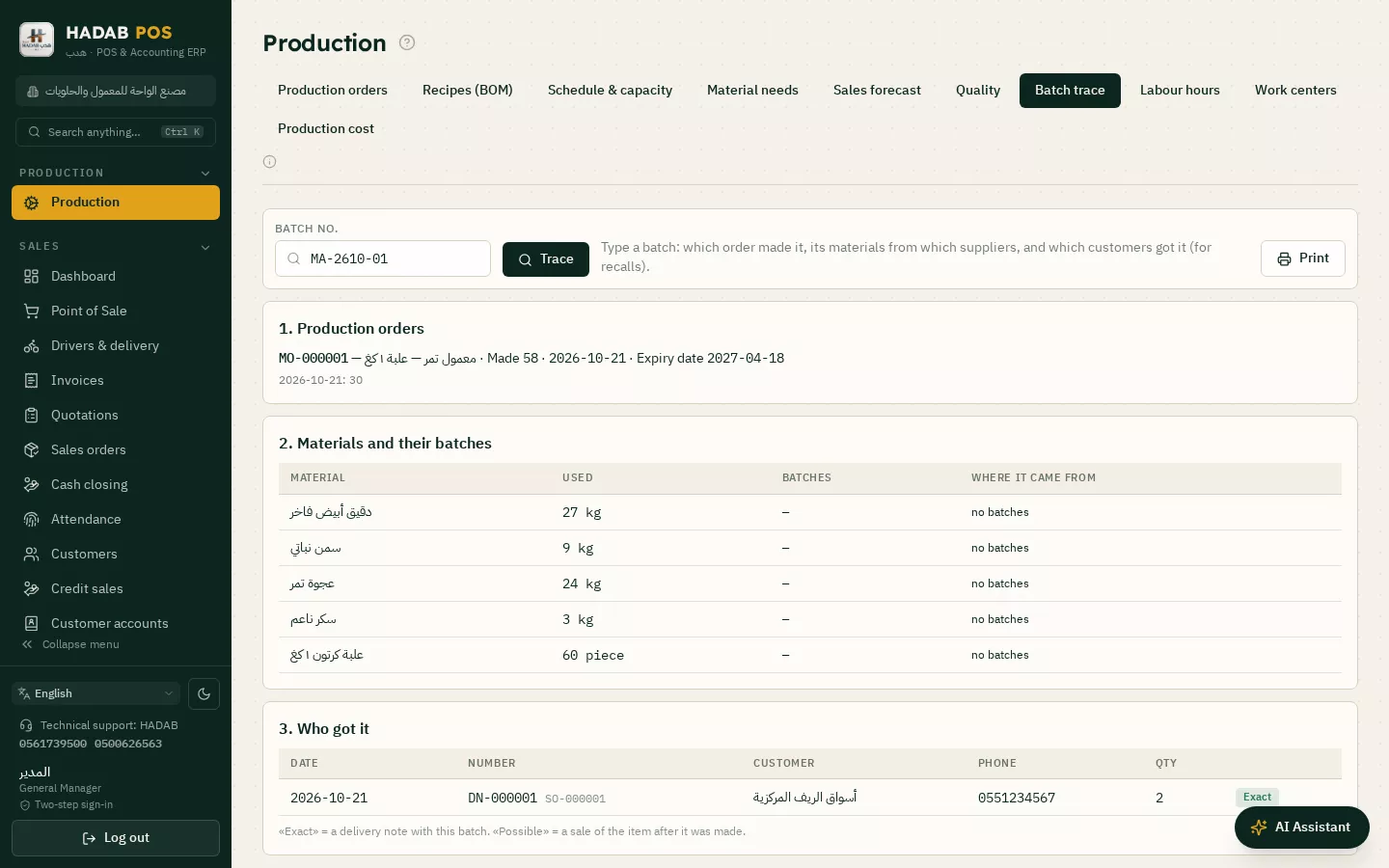
  • Enter the batch no. → the production order, the materials, their batches and supplier
  • The customers who received the same batch, with their phone numbers
  • Recipe versions: every edit is kept and you can go back to any version
  • Quality report: pass and reject rate per product
Batch trace: the production order, materials and the customers who received it
ZATCA compliantPhase 2: every invoice is signed and sent to ZATCA automatically with a QR code.
Works offlineSelling never stops, and invoices are sent when the connection is back.
Your data stays with youOn your computer in the shop, with a daily backup to your email.
Saudi supportWe help you install and link over WhatsApp.

How much does it cost?

All prices include VAT, with a fully featured 14-day free trial.

POS plan

1,500 SAR

For the first year, then 575 SAR a year. The till, e-invoicing, stock, purchases, customers and reports.

Accounting plan

3,000 SAR

For the first year, then 575 SAR a year. Everything above plus full accounting, payroll, zakat and financial statements.

Plan details and extra devices

Questions about Factory & production software

Is HADAB Factory a separate program?

It is the same HADAB program in an edition made for factories: the menu starts with production, and the till is there if you also sell over the counter. It includes everything on the Accounting plan.

How does it work out the product cost?

From the materials really issued to the order, plus labour and running costs, divided by the quantity really made. The difference from the recipe shows in the cost report.

Does it handle half-made items?

Yes. Put the half-made item as a material in another product's recipe; if it is short, a sub-order is made for it automatically.

Can I deliver to the customer in parts and invoice once?

Yes. A sales order can be delivered with several delivery notes, then one tax invoice is made for everything delivered.

Is there a mobile app for the shop floor?

No. HADAB Factory is a Windows program; workers' hours and quality checks are entered on the computer.

How much does HADAB Factory cost?

It is on the Accounting plan: 3,000 SAR for the first year, then 575 SAR a year, with a 14-day free trial.

My staff do not read Arabic. Can they use it?

Yes. The program is in Arabic, English, Turkish and Urdu, and each user can work in their own language.

Is it compliant with ZATCA Phase 2 (Fatoora)?

Yes. You link the device from inside the program with an OTP from the ZATCA portal. After that every invoice is signed and sent to ZATCA automatically, with an approved QR code.

More pages

Ready to start?

Message us on WhatsApp and we will help you install and link with Fatoora.

+966 56 173 9500  ·  +966 50 062 6563

WhatsApp Free trial