HADABPOS Free trial
Fish shop POS — ZATCA Phase 2 compliant

POS for fish shops: by the kilo, with cleaning and frying

Fish is sold by weight, often with cleaning, cutting and frying, and restaurants buy from you on credit. HADAB reads the weight from the scale or from the scale barcode label, adds cleaning and frying to the same invoice, records wastage with its reason, and gives every restaurant a credit limit and a statement.

Windows — version 1.0.149 — 140 MB

Sell by the kilo · Cleaning and frying · Restaurant accounts · Works offline

HADAB POS › Fish & seafood shop POS

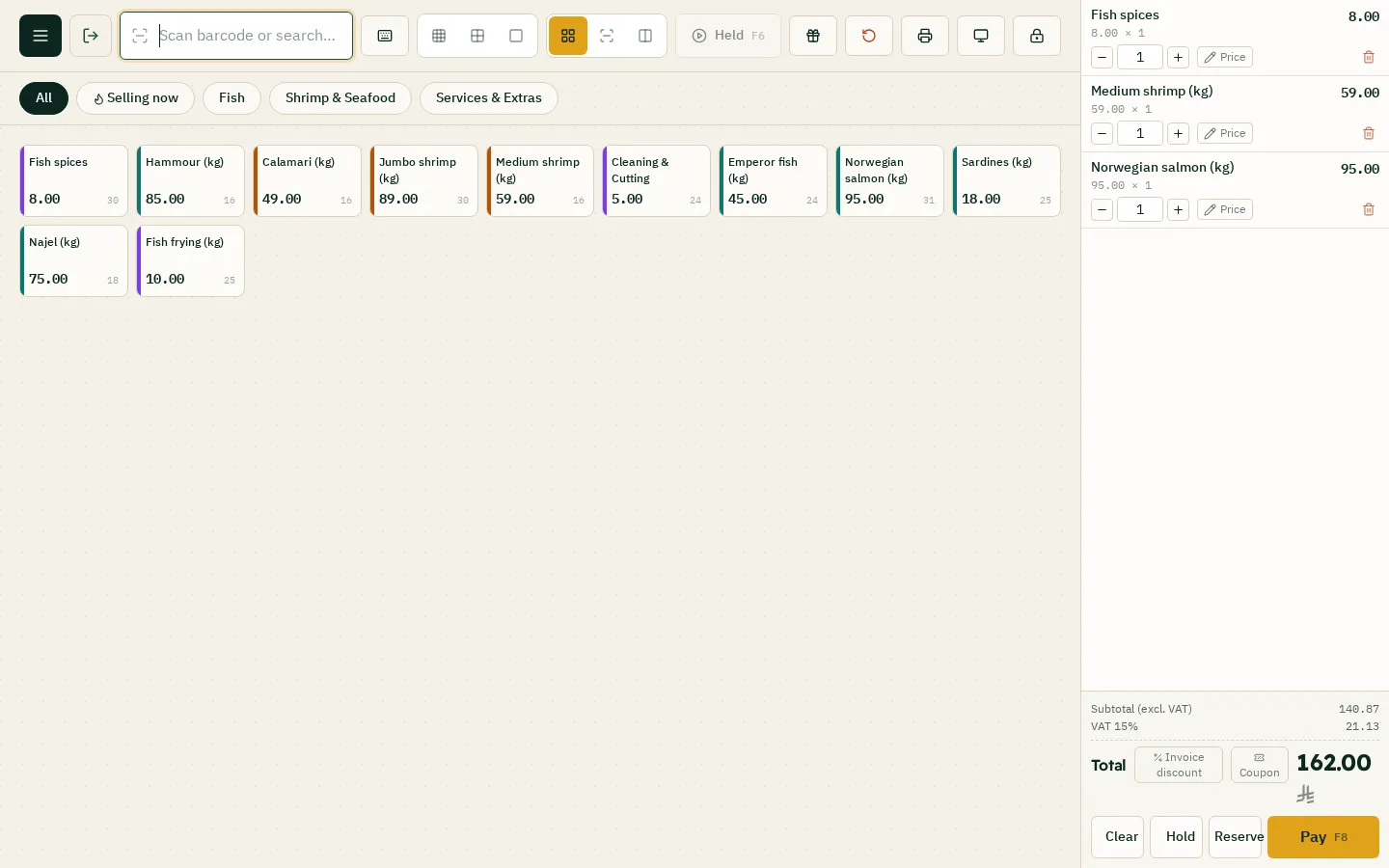
Weight and service on one invoice

At the till

The item is priced by the kilo.

  • Read the weight from the scale linked to the computer, or type it
  • Scale barcodes: the label brings in the item with its weight or price
  • Cleaning and frying as service items with no stock, on the same invoice
  • Split payment: cash and card

Delivery

Phone orders to the customer's home.

  • Choose "delivery" at payment and pick the driver
  • A copy for the driver with the customer's address
  • The cash each driver holds and handing it in
  • Send the invoice on WhatsApp
Sales screen: fish, shrimp and services

Wastage and credit

Wastage and stock

Fish cannot wait.

  • Wastage with its reason: spoiled or expired
  • A wastage and loss report with its value
  • Stocktakes and adjusting the differences
  • An account and balance for every supplier

Restaurants and hotels

Half the sales go to restaurants.

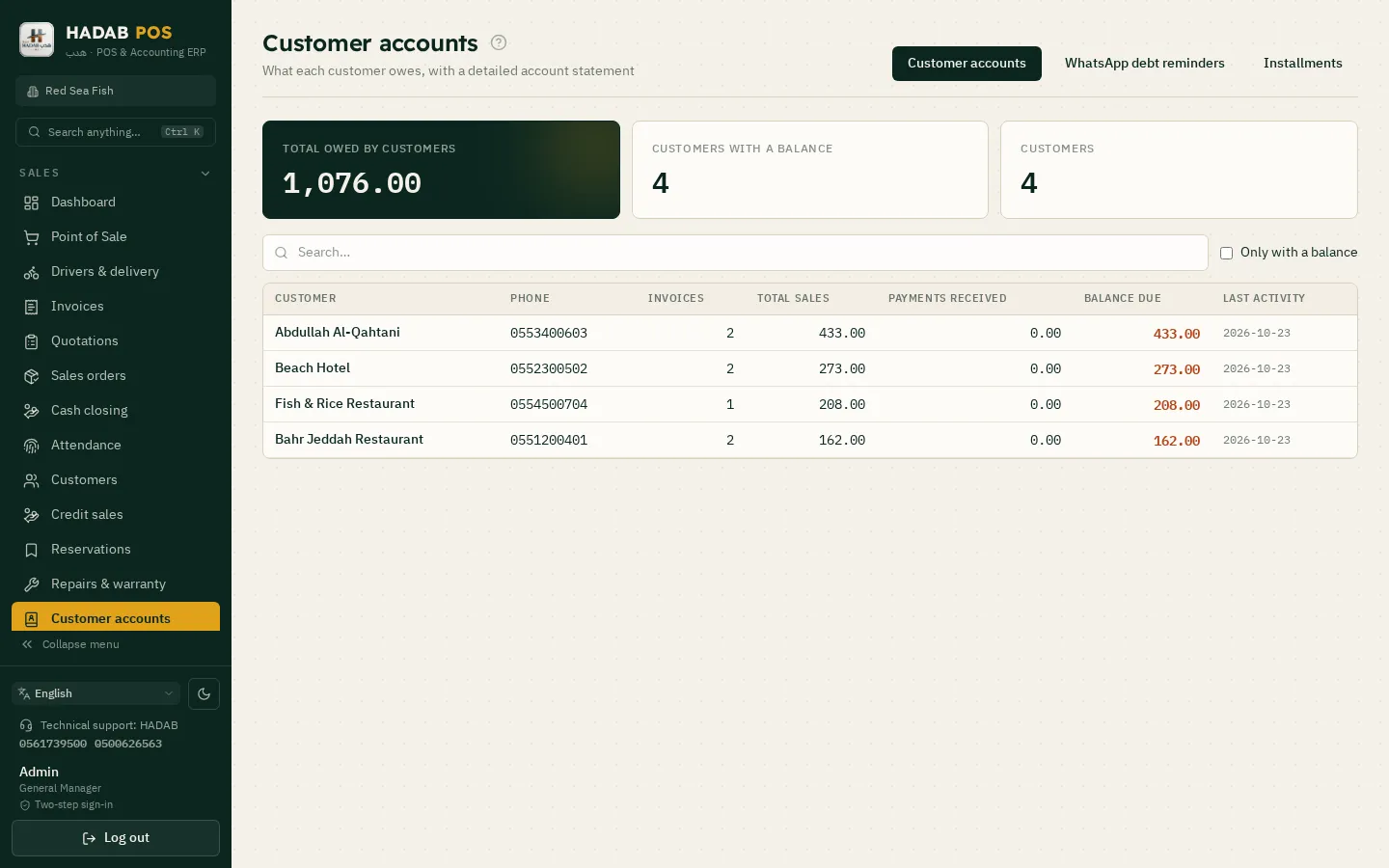
  • Credit sales with a limit per customer
  • A statement and balance reminders on WhatsApp
  • A tax invoice with the restaurant's VAT number
  • Quotations for restaurants (Accounting plan)
Customers: restaurant balances and statements
ZATCA compliantPhase 2: every invoice is signed and sent to ZATCA automatically with a QR code.
Works offlineSelling never stops, and invoices are sent when the connection is back.
Your data stays with youOn your computer in the shop, with a daily backup to your email.
Saudi supportWe help you install and link over WhatsApp.

How much does it cost?

All prices include VAT, with a fully featured 14-day free trial.

POS plan

1,500 SAR

For the first year, then 575 SAR a year. The till, e-invoicing, stock, purchases, customers and reports.

Accounting plan

3,000 SAR

For the first year, then 575 SAR a year. Everything above plus full accounting, payroll, zakat and financial statements.

Plan details and extra devices

Questions about Fish & seafood shop POS

Does the program work with scale barcodes?

Yes. You set the label format once (the prefix, the item code length, and whether the value is weight or price). After that the cashier scans the label and the item comes in with its weight or price.

How do I charge for cleaning and frying?

Set them up as service items with no stock, at a fixed price or by the kilo, and add them to the same invoice as the fish.

Does it turn a whole fish into fillets and deduct it from stock?

No. There is no converting one item into other items. You set up the fillet as its own item with its own stock, and bring it in with a purchase invoice or a stocktake.

Which edition do I download?

The shops and supermarkets edition. It has selling by weight, the scale and delivery with a driver.

Is it compliant with ZATCA Phase 2 (Fatoora)?

Yes. You link the device from inside the program with an OTP from the ZATCA portal. After that every invoice is signed and sent to ZATCA automatically, with an approved QR code.

How much does it cost?

The POS plan is 1,500 SAR for the first year, then 575 SAR a year. The Accounting plan is 3,000 SAR for the first year, then 575 SAR a year. Each extra till is 575 SAR. All prices include VAT. Example: 3 tills on the POS plan = 2,650 SAR for the first year, then 1,725 SAR a year.

More pages

Ready to start?

Message us on WhatsApp and we will help you install and link with Fatoora.

+966 56 173 9500  ·  +966 50 062 6563

WhatsApp Free trial