HADABPOS Free trial
New add-on for HADAB Salon — 115 SAR a year

Online booking for your salon: clients book from their phone, the request reaches you ready

Your salon has its own link. Clients open it with no app, pick the service, the staff member and a free time, and enter their name and mobile. The request lands in «Booking requests» in the salon program with an alert; you accept it with one press and it becomes a booking in the day's schedule, or you decline it with a reason.

Windows — version 1.0.211 — 150 MB

No app for the client · Staff hours and leave respected · One-press accept · Free during the trial

HADAB POS › Online booking for salons

From the salon link to the day's schedule

A link of your own

Copy it from Settings and send it on WhatsApp or Instagram.

  • The client opens the link on her phone with no app to download
  • The page is in Arabic or English
  • She picks the service, then the staff member (or anyone), then a free time
  • She enters her name and mobile and sends the request
  • She follows the request's status from its own link

Times that are really free

The page offers only times that suit the salon and the staff member.

  • Opening hours for each day, and the salon's days off
  • A shortest notice before the appointment and how far ahead clients may book
  • The length of each service in minutes; services you have not marked do not show
  • No booking in the past, outside the hours, or at a time the staff member is busy

The request arrives ready, and the decision is yours

Booking requests

In the queue, with a red count and a sound alert.

  • Choose the staff member and press «Accept»: it becomes a normal booking in the day's schedule
  • Or «Decline» with a reason the client sees
  • The time is not held until you accept
  • A confirmation message is ready in WhatsApp; you press send yourself
  • Deposit instructions (for example an account number) are shown to the client after you accept

Staff hours and alerts

Salon features that work together with online booking.

  • Each staff member can have her own hours, a day off and dated leave, and is not offered for booking while away
  • A yellow warning for the cashier about a client with two or more no-shows (the limit is in Settings); it is a warning only and never blocks the booking
  • An optional SMS reminder before the appointment (off by default, needs the SMS provider to be set up)
  • A limit on requests per mobile and per network
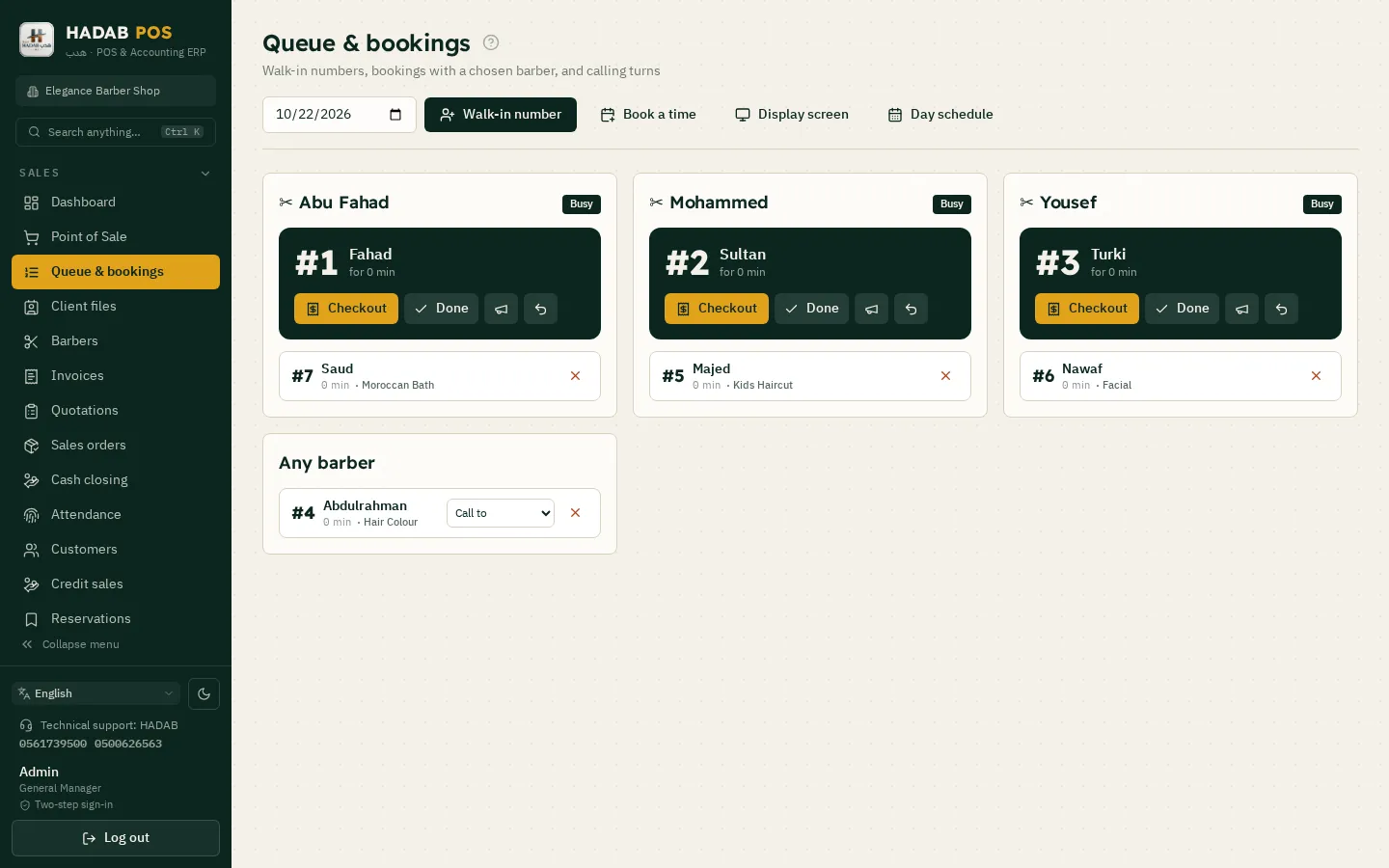
Bookings and the queue: each staff member and her schedule

What it does, what it does not, and the price

Plainly: what it does not have

So you know exactly what you are getting.

  • No online payment or online deposit (the deposit is transfer instructions you write)
  • No automatic WhatsApp: the confirmation is prepared and you press send
  • Every request needs the salon's acceptance
  • It needs the internet, and requests arrive while the program is open on the salon's device (queue or cashier); otherwise the page shows «Closed now»

Price and activation

An add-on for HADAB Salon.

  • 115 SAR a year, VAT included
  • Free during the free trial
  • The manager adds it from Settings → Subscription with one press
  • Works immediately for a year; pay the invoice within 14 days
  • Salon edition only, and it needs the latest program update
  • Read: online booking guide for salons · salon POS
ZATCA compliantPhase 2: every invoice is signed and sent to ZATCA automatically with a QR code.
Works offlineSelling never stops, and invoices are sent when the connection is back.
Your data stays with youOn your computer in the shop, with a daily backup to your email.
Saudi supportWe help you install and link over WhatsApp.

How much does it cost?

All prices include VAT, with a fully featured 14-day free trial.

POS plan

1,500 SAR

For the first year, then 575 SAR a year. The till, e-invoicing, stock, purchases, customers and reports.

Accounting plan

2,500 SAR

For the first year, then 575 SAR a year. Everything above plus full accounting, payroll, zakat and financial statements.

Plan details and extra devices

Questions about Online booking for salons

Does the client need to download an app?

No. She opens the salon's link on her phone and books straight away, in Arabic or English.

How much does online booking cost?

115 SAR a year, VAT included, as an add-on for HADAB Salon. It is free to try during the free trial.

How do I turn it on?

The manager adds it from Settings → Subscription with one press; it works immediately for a year and an invoice is issued to pay within 14 days. Then switch on «Online booking» in Settings and the salon link appears.

Is the booking confirmed automatically?

No. The request arrives in «Booking requests» and you accept or decline it; the time is not held until you accept. After accepting, a WhatsApp confirmation is prepared and you press send yourself.

Are staff hours and leave respected?

Yes. Each staff member can have her own hours, a day off and dated leave; on her day off, on leave or outside her hours she is not offered for online booking.

Can the client pay a deposit from the page?

No. There is no online payment. You can write deposit instructions (for example an account number) that the client sees after you accept; the transfer happens outside the program.

What about clients who do not show up?

The program records «No-show» against her mobile. When a client with two or more no-shows is booked, the cashier sees a yellow warning. It is a warning only and never blocks the booking, and you can change the limit in Settings.

Is there a reminder before the appointment?

Optionally, an SMS reminder at the number of hours you choose (default 24 and 2), once per reminder time. It is off by default and works only when the SMS provider is set up in Settings.

Does it work if the internet is down or the device is off?

The booking link needs the internet, and requests arrive while the program is open on the salon's device (queue or cashier). If it is not, the page shows «Closed now». Selling at the cashier itself works offline.

More pages

Ready to start?

Message us on WhatsApp and we will help you install and link with Fatoora.

+966 56 173 9500  ·  +966 50 062 6563

WhatsApp Free trial