HADABPOS Free trial
Spare parts POS — ZATCA Phase 2 compliant

POS for car spare parts shops: find the part by car or by number

The customer says "oil filter, 2015 Camry" or reads you a number off the old part. HADAB keeps an OEM number, other numbers and the cars it fits for every part, so you find it by make, model and year or by chassis number, show its price and stock to the customer, and sell it with an e-invoice.

Windows — version 1.0.211 — 150 MB

Search by make, model, year · Chassis number (VIN) · OEM and other numbers · Excel import

HADAB POS › Car spare parts shop POS

From the car to the part

Search by car

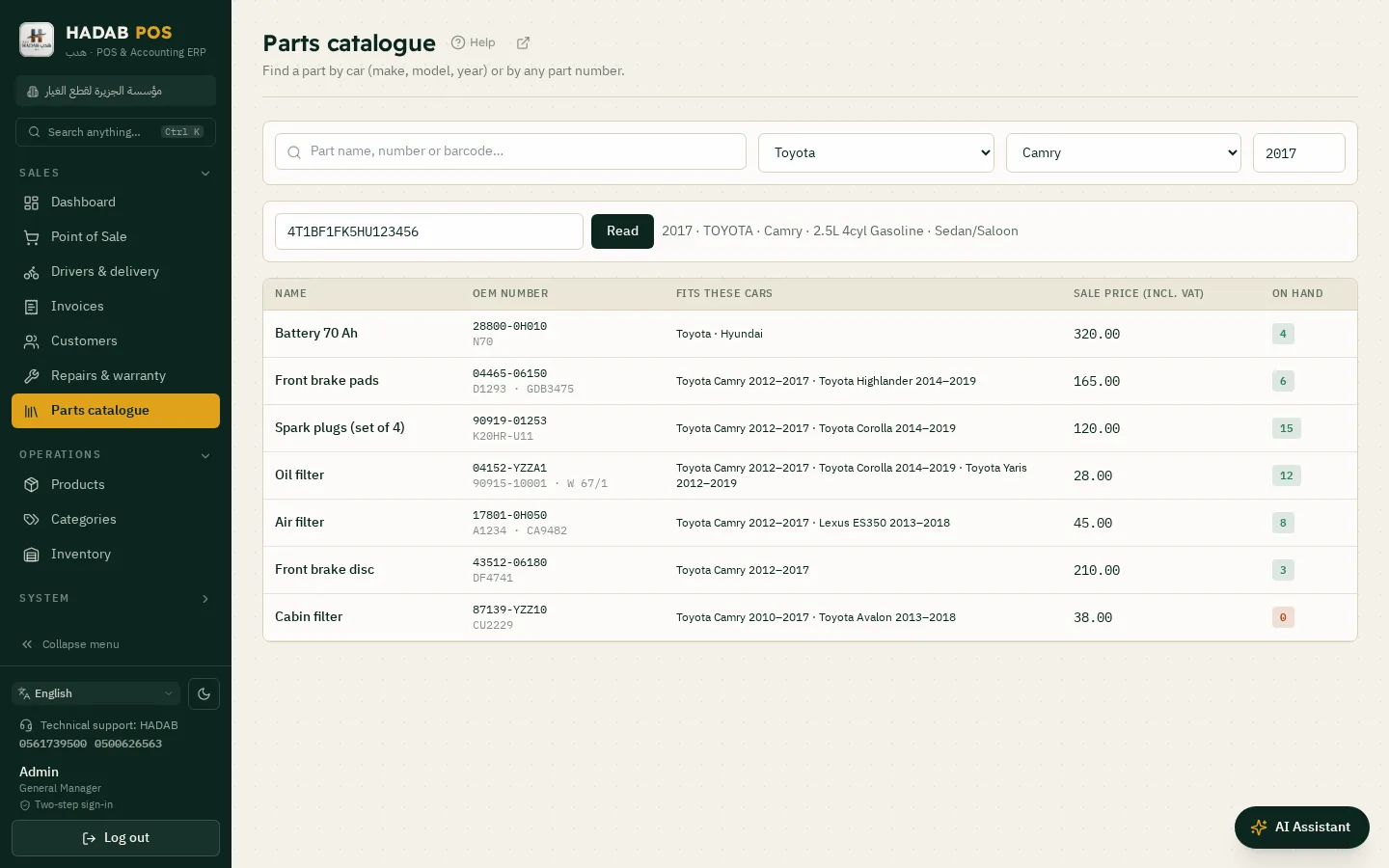
Pick the car and its parts appear.

  • Make, model and year from ready lists of the common makes
  • Chassis number (VIN): type the 17 characters and the car shows with its engine and its parts are listed (needs internet)
  • Parts in stock first, with price and stock
  • A part that fits «every model of the make» shows with each model

Search by number

The number on the old part or from the supplier sheet.

  • OEM number and the numbers other makers give the same part
  • A number matches without dashes or spaces (04152-YZZA1 = 04152yzza1)
  • Or the part name or barcode
  • The name shows in the screen language: Arabic, English, Turkish or Urdu
Parts catalogue: search by chassis number, the car's parts with price and stock

Build your own catalogue

First start

Pick your business and the system sets itself up.

  • At first start pick «Car spare parts» and tick the makes you sell
  • Your makes come first in the lists, with their models and production years ready (from the US NHTSA database)
  • The catalogue is switched on for you and can be changed in Settings
  • Chinese and some European makes may need you to type their models

The part card

Three fields that open the search.

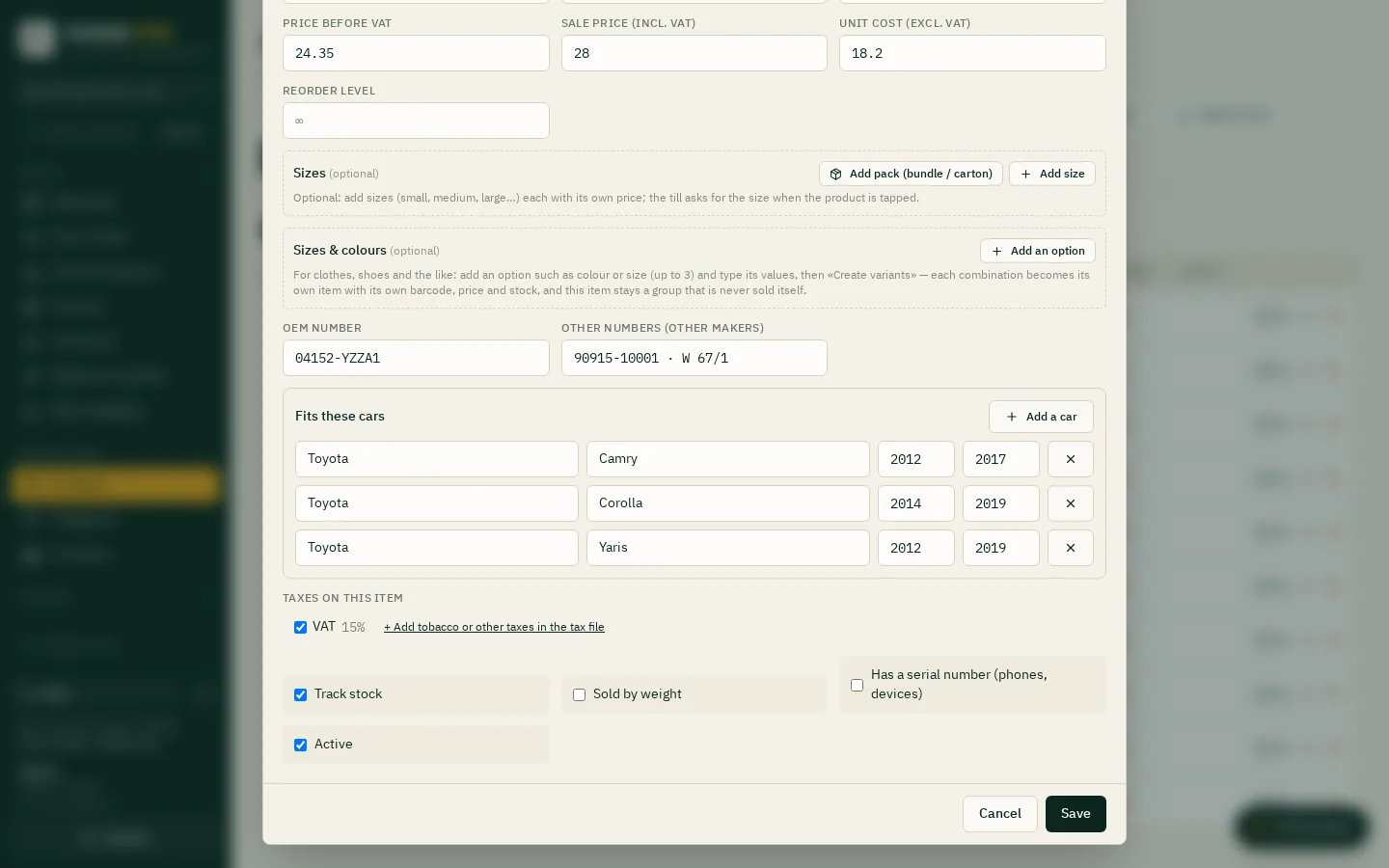
  • OEM number and other numbers from other makers
  • Fits these cars: make, model (or every model) and years from and to
  • Add as many cars to one part as you need
  • They reach every till and branch with the product

Excel import

Your supplier's sheet goes in once.

  • Columns OEM number, Other numbers and Fits these cars in import and export
  • Cars in one format: Toyota/Camry/2012-2017; Honda/Accord
  • Updates parts that exist and does not duplicate them
  • Thousands of parts in one go
Part card: OEM number, other numbers and the cars it fits

Sales, stock and accounts

Till and stock

The same HADAB till you know.

  • An invoice with VAT and the e-invoice under Phase 2
  • Stock for every part, a reorder level and stock counts
  • Purchase invoices from suppliers and their prices
  • A statement and credit sales to workshops and shops
ZATCA compliantPhase 2: every invoice is signed and sent to ZATCA automatically with a QR code.
Works offlineSelling never stops, and invoices are sent when the connection is back.
Your data stays with youOn your computer in the shop, with a daily backup to your email.
Saudi supportWe help you install and link over WhatsApp.

How much does it cost?

All prices include VAT, with a fully featured 14-day free trial.

POS plan

1,500 SAR

For the first year, then 575 SAR a year. The till, e-invoicing, stock, purchases, customers and reports.

Accounting plan

2,500 SAR

For the first year, then 575 SAR a year. Everything above plus full accounting, payroll, zakat and financial statements.

Plan details and extra devices

Questions about Car spare parts shop POS

Does it include the makers' catalogues with original part numbers?

No. The catalogue here is your own shop's data: you enter your part numbers and the cars they fit, or bring them from a supplier sheet. What we supply is the lists of makes, models and years. The makers' catalogue numbers and drawings are licensed data that we do not include.

Are there part diagrams (exploded views)?

No. There are no drawings and no dealer catalogue; those need licensed paid services.

Can it read a chassis number (VIN)?

Yes. Type the 17 characters on the Parts catalogue screen and press «Read»: the make, model, year and engine show. It needs internet and is most accurate for US-market cars; a Gulf or Chinese car may come back with a make but no model, and you pick the model by hand.

Does it find alternative parts by itself?

No. You type the other numbers for each part or import them from Excel, and then the search finds the part by any of them.

Where do I switch it on?

If you picked «Car spare parts» at first start it is already on. Otherwise Settings → POS → «Spare-parts catalogue». It is also available in the Workshop (car maintenance) edition.

Which edition do I download?

The shops and supermarkets edition, then pick «Car spare parts» at first start or switch the catalogue on in Settings.

Is it compliant with ZATCA Phase 2 (Fatoora)?

Yes. You link the device from inside the program with an OTP from the ZATCA portal. After that every invoice is signed and sent to ZATCA automatically, with an approved QR code.

How much does it cost?

The POS plan is 1,500 SAR for the first year, then 575 SAR a year. The Accounting plan is 2,500 SAR for the first year, then 575 SAR a year. Each extra till is 575 SAR. All prices include VAT. Example: 3 tills on the POS plan = 2,650 SAR for the first year, then 1,725 SAR a year.

More pages

Ready to start?

Message us on WhatsApp and we will help you install and link with Fatoora.

+966 56 173 9500  ·  +966 50 062 6563

WhatsApp Free trial