HADABPOS Free trial
Meal-plan subscriptions — ZATCA Phase 2 compliant

Meal-plan subscriptions for restaurants: sell the plan once, serve a meal each day

Healthy-meal kitchens, mandi restaurants and home-food brands sell monthly plans: the customer pays once and collects a meal every day. HADAB sells the plan at the till under the customer's mobile, and from the Subscriptions screen you serve each day's meal: its ingredients leave stock, the kitchen ticket prints, and you see what each subscriber has left and when it ends.

Windows — version 1.0.161 — 150 MB

A plan of N meals · Ingredients from stock · WhatsApp reminder · Works offline

HADAB POS › Meal-plan subscription software

One plan, paid once

Defining the plan

An ordinary item with subscription options.

  • Number of meals and validity in months (0 = no end)
  • A main dish, plus other dishes the subscriber may choose from (optional)
  • Sold at the till under the customer's mobile and kept on that number
  • One invoice paid up front, sent to ZATCA like any invoice

Subscribers

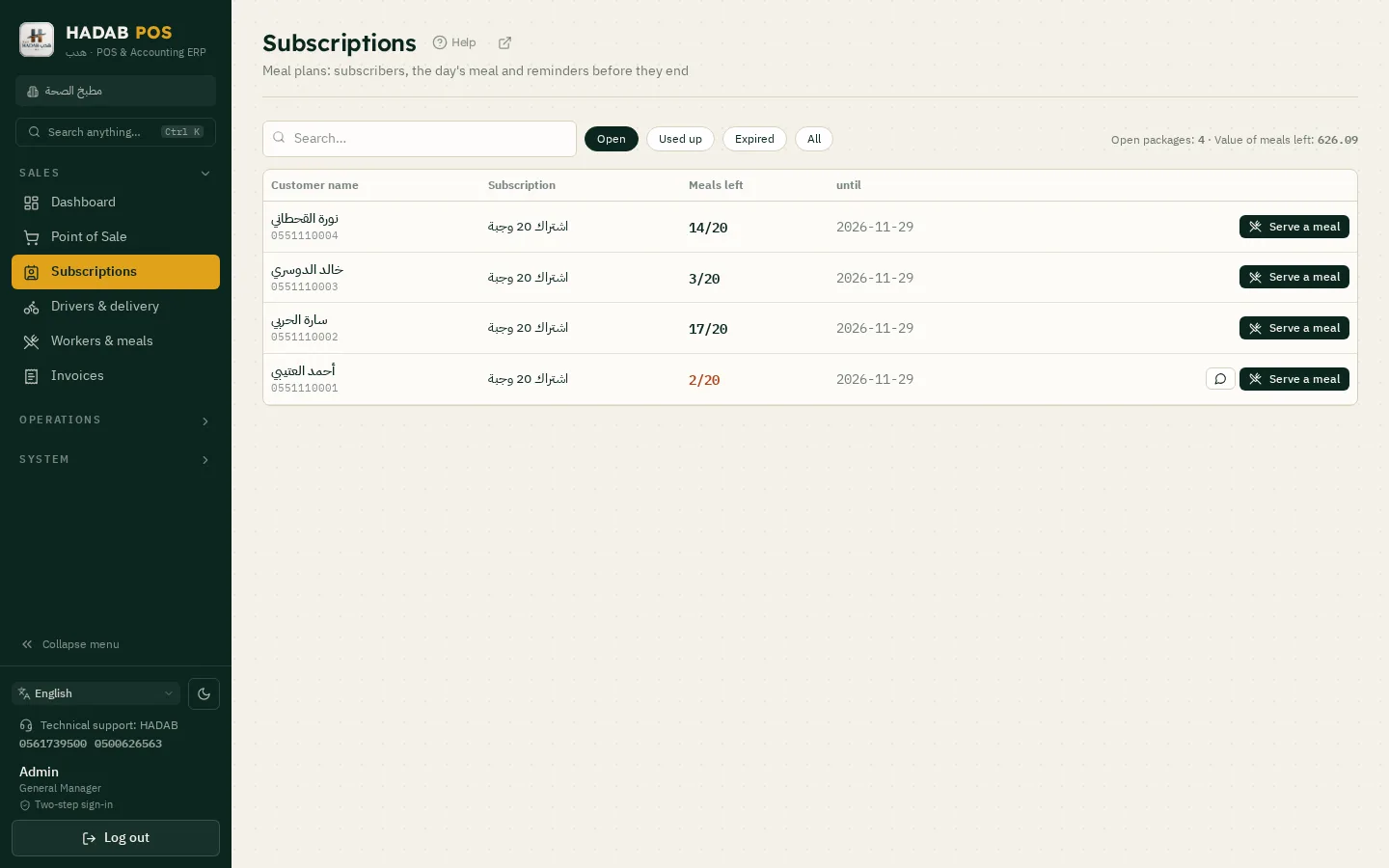
The Subscriptions screen.

  • Every subscriber with the meals left and the end date
  • Search by name or mobile; filter open / expired / finished
  • The value of the meals still owed
The Subscriptions screen: subscribers and the meals they have left

Today's meal comes off stock

Serving a meal

One tap from the Subscriptions screen.

  • Pick a dish of the plan, pickup or delivery
  • A kitchen ticket prints with the subscriber's name
  • The meal's ingredients are deducted from stock (its recipe, or a combo's items)
  • A meal served by mistake is undone: stock and the plan's count come back

Reminders and follow-up

Before the plan ends.

  • A WhatsApp reminder button with 2 meals left or 3 days to go (you press send)
  • A line in the daily summary for plans about to end
ZATCA compliantPhase 2: every invoice is signed and sent to ZATCA automatically with a QR code.
Works offlineSelling never stops, and invoices are sent when the connection is back.
Your data stays with youOn your computer in the shop, with a daily backup to your email.
Saudi supportWe help you install and link over WhatsApp.

How much does it cost?

All prices include VAT, with a fully featured 14-day free trial.

POS plan

1,500 SAR

For the first year, then 575 SAR a year. The till, e-invoicing, stock, purchases, customers and reports.

Accounting plan

3,000 SAR

For the first year, then 575 SAR a year. Everything above plus full accounting, payroll, zakat and financial statements.

Plan details and extra devices

Questions about Meal-plan subscription software

Does a subscription deduct the meal's ingredients from stock?

Yes. Each meal served deducts its ingredients by the dish's recipe, or the items of a combo, and its cost goes to cost of sales.

Is the revenue spread over the months of the plan?

No. The plan is one invoice when it is paid and counts as that day's sales; the cost of the ingredients is booked with each meal served.

Can I freeze a plan or dispatch meals to drivers automatically?

No. There is no freezing, no automatic driver dispatch and no fixed daily menu; the subscriber picks a dish from the plan's dishes.

Which edition do I download?

The restaurants and cafés edition. The Subscriptions screen is in its menu.

How much does it cost?

The POS plan is 1,500 SAR for the first year, then 575 SAR a year. The Accounting plan is 3,000 SAR for the first year, then 575 SAR a year. Each extra till is 575 SAR. All prices include VAT. Example: 3 tills on the POS plan = 2,650 SAR for the first year, then 1,725 SAR a year.

More pages

Restaurant POS Café & coffee shop POS Grocery & supermarket POS Barbershop & salon POS ZATCA Phase 2 POS software Mobile phone shop POS Auto parts shop POS POS in Riyadh POS in Jeddah POS in Dammam & Khobar QR table ordering for restaurants & cafés QR table ordering guide Pharmacy & cosmetics shop POS Perfume, oud & incense shop POS Clothing & abaya shop POS Electronics & appliance shop POS Wholesale & distribution POS Fast food, shawarma & burger POS Pizza & pastry shop POS Ice cream & dessert shop POS Fish & seafood shop POS Household goods & cleaning supplies shop POS Shoe & bag shop POS Pet supplies shop POS Tyre & battery shop POS Honey & bee products shop POS Factory & production software Car workshop software Tailor shop software POS alternatives: how to compare Cloud POS or on your computer? Restaurant POS comparison Learning center Course — Restaurants and cafés Course — Supermarkets and grocery shops Course — Salons Course — Factories Course — Tailor shops Course — Car workshops QR table ordering Occasion messages on the receipt Add-ons (Smart Assistant package, and QR ordering for restaurants) Product sales detail (how many sold, who sold it, when) A feature shows on one PC but not on the linked cashier PC? Sales for certain hours (e.g. lunch only) Report start and end time (not just the date) The «All» tab on the sales screen is optional Colouring item and category buttons Product tile (icon) size on the till Customer display Staff attendance Voided after the kitchen Deleting an item or raw material End-of-day leftovers (food left over) Staff meal (worker meals) Move invoices from one driver to another Delivery app menus (HungerStation, Jahez, Keeta, Noon) Branches on the manager's device The general manager signs in on any branch device Branch users from the manager's device Stock between linked branches All-branches report Manager alerts about branches Branch link health Send the full menu to the branches All branch data on the manager device ZATCA with branches Unlinking branches Link branches to the manager's device A note with a price (cheese +1) Notes & extras (priced or free) Item notes (hot sauce, no sugar…) Sizes & colours Invoice print format (A4 or 80 mm) Settings → Printing → Invoice template Print a product barcode The second language on the invoice Settings → Printing Blank sheet after an A4 quote / invoice Settings → Printing Updating the program Backup and restore Forgot the password Branch link — new options Control a branch from the manager's device Cashier steps out without closing the cash Opening and closing the shift The tutorial videos Your data stays on your PC Payment: cash, card, transfer or split Purchases → Supplier returns Sales returns Holding a sale and till shortcuts Sending to the kitchen and station tickets Order type: dine-in / takeaway / delivery Tables and areas Fitting, part delivery, work-card barcode, workload and sizes from Excel Tailoring orders Workshop extras The workshop (HADAB Car) Repair & warranty orders Reservation with a deposit Dish deposit Barbers Queue & bookings Session packages Client files Home visits Ladies' salon Consumables Drivers & delivery Sending the invoice on WhatsApp Invoices Quotations Installment sales Reminding customers of their debts Purchases → Supplier prices Supplier statement reconciliation Purchases → Supplier accounts Customer accounts Inventory → "Write-off" button «New raw material» inside a purchase invoice Selling a quarter or half piece Stocktake in a restaurant Raw materials and recipes Order what's low — one purchase order per supplier in one click Daily count of the key items Stocktake approval Counting with the phone camera and by carton Accountant desk POS layout for shops Scan an expense bill Contracts & progress bills Letters of guarantee & letters of credit Production orders Sales orders and delivery notes Consolidated financial statements Report builder Warehouses Batches and expiry dates Expiry dates Inventory → «Full stocktake» tab → «New stocktake» Inventory → Stock by branch Translating notes An invoice with no saved products Inventory → «Full stock & buying» Increasing and adjusting stock Inventory → Excel import Discount coupons Gift cards Promotions Manager mobile Products → Add Delete many products in one click Purchases → «Purchase orders» → «Approval limit» Delete a purchase invoice Purchases Expenses → Add Payroll & GOSI Fixed assets Prepaid expenses Zakat & withholding → Zakat Zakat & withholding → Withholding tax Accounting → Cost centers Customers → «Price lists» Planning → «Recurring invoices» → «New recurring invoice» Purchases → open the purchase → «Landed costs» → «Add costs» Reports → income statement or balance sheet Serial numbers The shield button at the bottom of the side menu → «Two-step sign-in» Employee custody — employee link and settlement Smart accountant alerts Treasury Budget & planning Accounting → Fiscal year-end close Accounting → Bank reconciliation VAT return with the 16 ZATCA boxes Attachments on expenses and purchases Opening balances Stock costing method Approving entries and expenses FX revaluation Cash flow statement Easy journal entry Doubtful debts provision and write-off Customer advances Leases (IFRS 16) Financial ratios Notes to the financial statements Printing a cheque Accounting books & reports Chart of accounts (account tree) Accounting The VAT return ZATCA certificate validity ZATCA on the dashboard ZATCA results in words Moving the AI assistant button E-Invoicing (ZATCA) Company details Changing a login name Deleting a user Users & rights Settings → Branches Settings → Linked devices Running in the background Settings → Loyalty Settings → Currencies Audit log The «Sale complete» window after a sale The on-screen keyboard Program and receipt language The Windows warning at install A new device or a Windows reinstall Working offline Subscribing after the free trial Subscribing after the trial Confirm windows Reports Search everything, favourites and the (?) button Till shortcuts, quick quantity and undo Shop readiness System colours and the «Sadu» theme Dark mode and bigger text/buttons «Today's tasks» summary by email and phone Dashboard A colour per branch The system on a phone Pricing هذه الصفحة بالعربي یہ صفحہ اردو میں Bu sayfa Türkçe

Ready to start?

Message us on WhatsApp and we will help you install and link with Fatoora.

+966 56 173 9500  ·  +966 50 062 6563

WhatsApp Free trial